> ## Documentation Index
> Fetch the complete documentation index at: https://wb-21fd5541-docs-1778-mysql-updates.mintlify.site/llms.txt
> Use this file to discover all available pages before exploring further.
# クエリパネル
> このページの一部の機能はベータ版であり、機能フラグの後ろに隠れています。関連するすべての機能をアンロックするには、プロフィールページの自己紹介に `weave-plot` を追加してください。
W\&B Weaveをお探しですか?W\&Bの生成AIアプリケーション構築のためのツール群ですか?weaveのドキュメントはここで見つけることができます: [wandb.me/weave](https://wandb.github.io/weave/?utm_source=wandb_docs\&utm_medium=docs\&utm_campaign=weave-nudge).
クエリパネルを使用してデータをクエリし、インタラクティブに視覚化します。
 ## クエリパネルを作成する
ワークスペースまたはレポート内にクエリを追加します。
1. プロジェクトのワークスペースに移動します。
2. 右上のコーナーにある `Add panel` をクリックします。
3. ドロップダウンから `Query panel` を選択します。
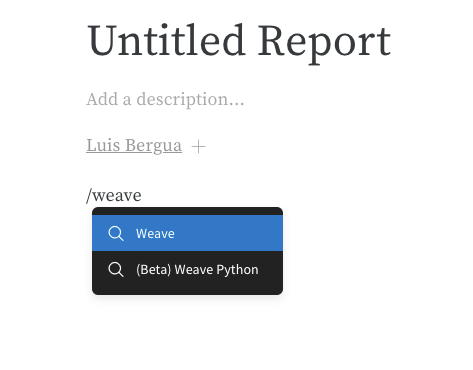
`/Query panel` と入力して選択します。
## クエリパネルを作成する
ワークスペースまたはレポート内にクエリを追加します。
1. プロジェクトのワークスペースに移動します。
2. 右上のコーナーにある `Add panel` をクリックします。
3. ドロップダウンから `Query panel` を選択します。
`/Query panel` と入力して選択します。
 または、一連の Runs とクエリを関連付けることができます。
1. レポート内で、`/Panel grid` と入力して選択します。
2. `Add panel` ボタンをクリックします。
3. ドロップダウンから `Query panel` を選択します。
## クエリコンポーネント
### 式
クエリ式を使用して、W\&Bに保存されたデータ、例えば Runs、Artifacts、Models、Tables などをクエリします。
#### 例: テーブルをクエリする
W\&B Tableをクエリしたいとします。トレーニングコード内で `"cifar10_sample_table"` という名前のテーブルをログします:
```python theme={null}
import wandb
wandb.log({"cifar10_sample_table":})
```
クエリパネル内でテーブルをクエリするには次のようにします:
```python theme={null}
runs.summary["cifar10_sample_table"]
```
または、一連の Runs とクエリを関連付けることができます。
1. レポート内で、`/Panel grid` と入力して選択します。
2. `Add panel` ボタンをクリックします。
3. ドロップダウンから `Query panel` を選択します。
## クエリコンポーネント
### 式
クエリ式を使用して、W\&Bに保存されたデータ、例えば Runs、Artifacts、Models、Tables などをクエリします。
#### 例: テーブルをクエリする
W\&B Tableをクエリしたいとします。トレーニングコード内で `"cifar10_sample_table"` という名前のテーブルをログします:
```python theme={null}
import wandb
wandb.log({"cifar10_sample_table":})
```
クエリパネル内でテーブルをクエリするには次のようにします:
```python theme={null}
runs.summary["cifar10_sample_table"]
```
 これを分解すると:
* `runs` は、ワークスペースに Query Panel があるときに自動的に Query Panel Expressions に注入される変数です。その値は、その特定のワークスペースに表示される Runs のリストです。[Run内の利用可能な異なる属性についてはこちらをお読みください](/ja/models/track/public-api-guide/#understanding-the-different-attributes)。
* `summary` は、Run の Summary オブジェクトを返す操作です。Opsは *マップされる* ため、この操作はリスト内の各 Run に適用され、その結果として Summary オブジェクトのリストが生成されます。
* `["cifar10_sample_table"]` は Pick 操作(角括弧で示され)、`predictions` というパラメータを持ちます。Summary オブジェクトは辞書またはマップのように動作するため、この操作は各 Summary オブジェクトから `predictions` フィールドを選択します。
インタラクティブに独自のクエリの書き方を学ぶには、[こちらのレポート](https://wandb.ai/luis_team_test/weave_example_queries/reports/Weave-queries---Vmlldzo1NzIxOTY2?accessToken=bvzq5hwooare9zy790yfl3oitutbvno2i6c2s81gk91750m53m2hdclj0jvryhcr)を参照してください。
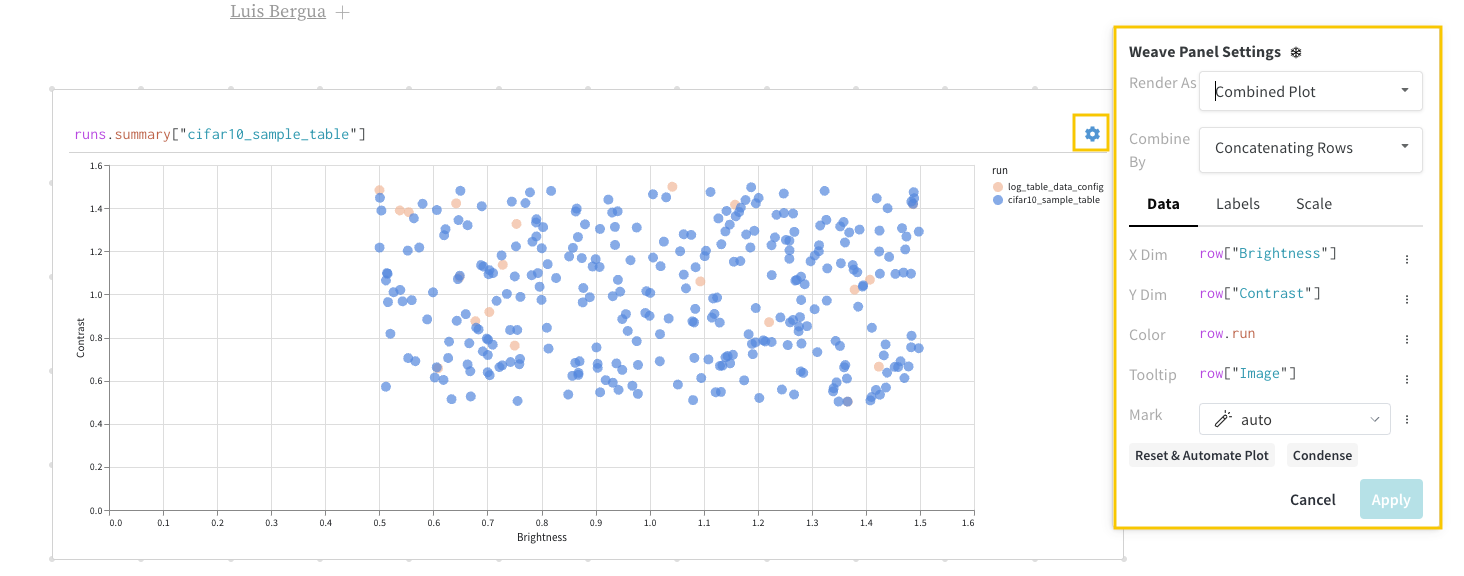
### 設定
パネルの左上コーナーにあるギアアイコンを選択してクエリ設定を展開します。これにより、ユーザーはパネルのタイプと結果パネルのパラメータを設定できます。
これを分解すると:
* `runs` は、ワークスペースに Query Panel があるときに自動的に Query Panel Expressions に注入される変数です。その値は、その特定のワークスペースに表示される Runs のリストです。[Run内の利用可能な異なる属性についてはこちらをお読みください](/ja/models/track/public-api-guide/#understanding-the-different-attributes)。
* `summary` は、Run の Summary オブジェクトを返す操作です。Opsは *マップされる* ため、この操作はリスト内の各 Run に適用され、その結果として Summary オブジェクトのリストが生成されます。
* `["cifar10_sample_table"]` は Pick 操作(角括弧で示され)、`predictions` というパラメータを持ちます。Summary オブジェクトは辞書またはマップのように動作するため、この操作は各 Summary オブジェクトから `predictions` フィールドを選択します。
インタラクティブに独自のクエリの書き方を学ぶには、[こちらのレポート](https://wandb.ai/luis_team_test/weave_example_queries/reports/Weave-queries---Vmlldzo1NzIxOTY2?accessToken=bvzq5hwooare9zy790yfl3oitutbvno2i6c2s81gk91750m53m2hdclj0jvryhcr)を参照してください。
### 設定
パネルの左上コーナーにあるギアアイコンを選択してクエリ設定を展開します。これにより、ユーザーはパネルのタイプと結果パネルのパラメータを設定できます。
 ### 結果パネル
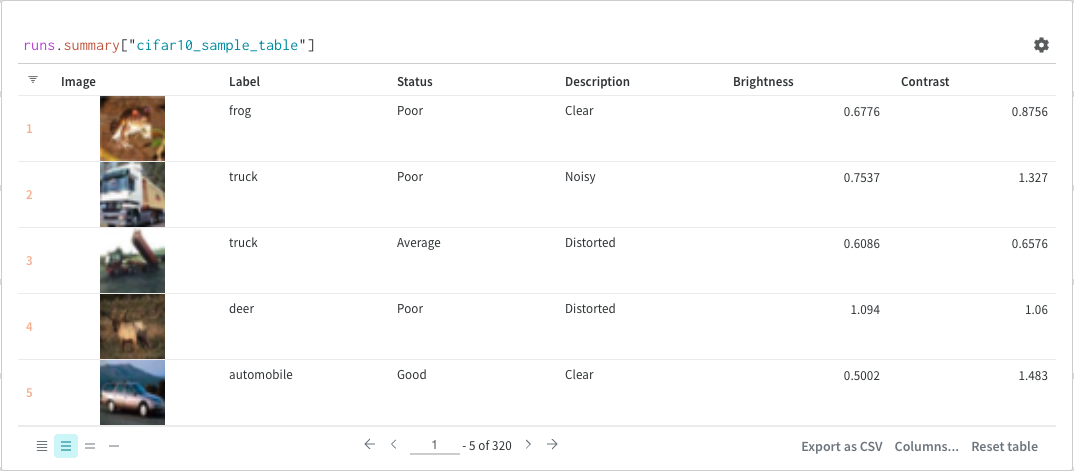
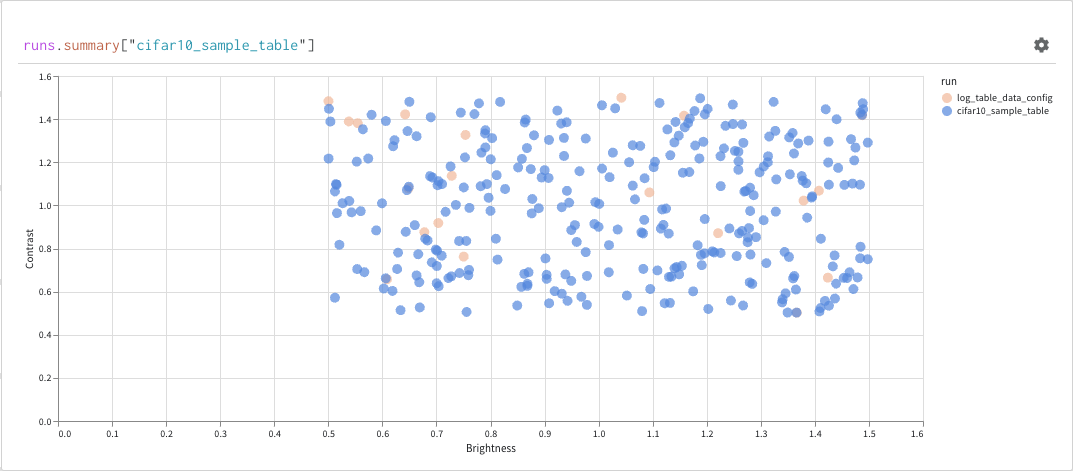
最後に、クエリ結果パネルは、選択したクエリパネル、設定によって設定された構成に基づいて、データをインタラクティブに表示する形式でクエリ式の結果をレンダリングします。次の画像は、同じデータのテーブルとプロットを示しています。
### 結果パネル
最後に、クエリ結果パネルは、選択したクエリパネル、設定によって設定された構成に基づいて、データをインタラクティブに表示する形式でクエリ式の結果をレンダリングします。次の画像は、同じデータのテーブルとプロットを示しています。
 ## 基本操作
次に、クエリパネル内で行える一般的な操作を示します。
### ソート
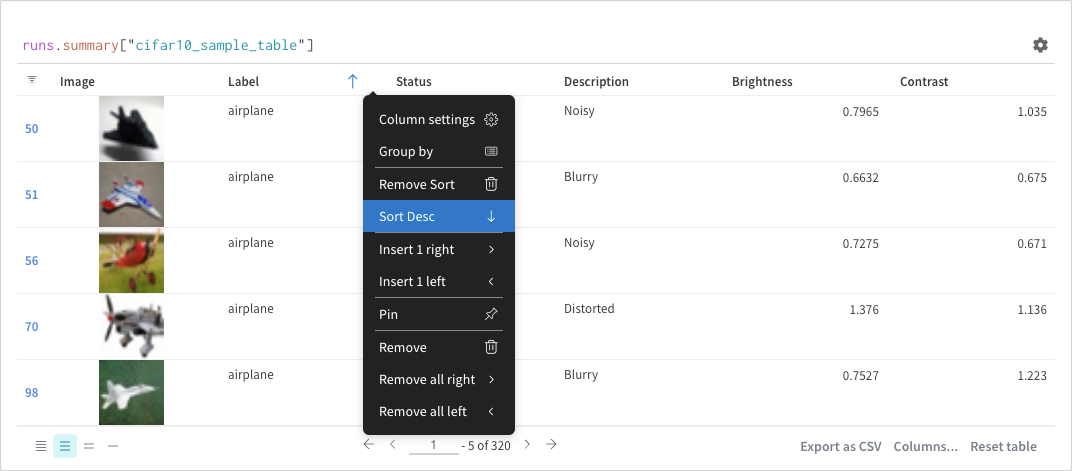
列オプションからソートします:
## 基本操作
次に、クエリパネル内で行える一般的な操作を示します。
### ソート
列オプションからソートします:
 ### フィルター
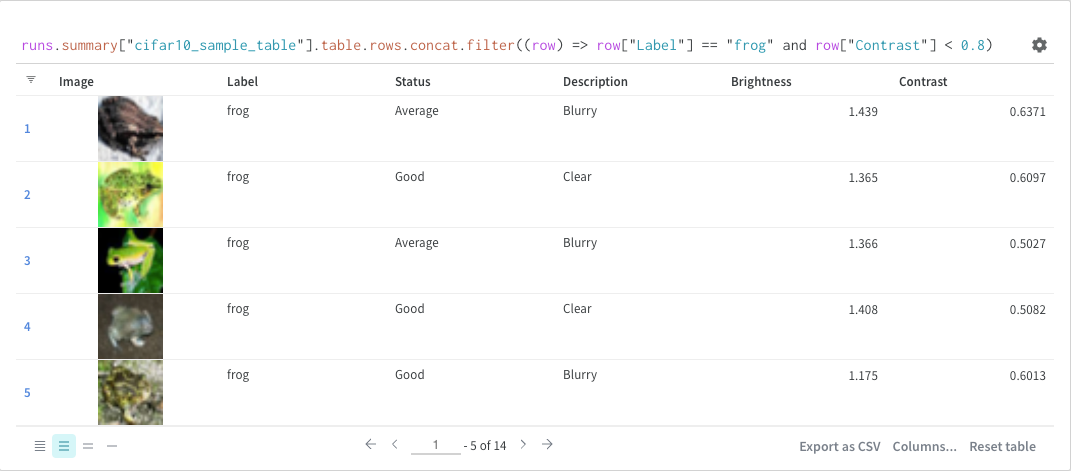
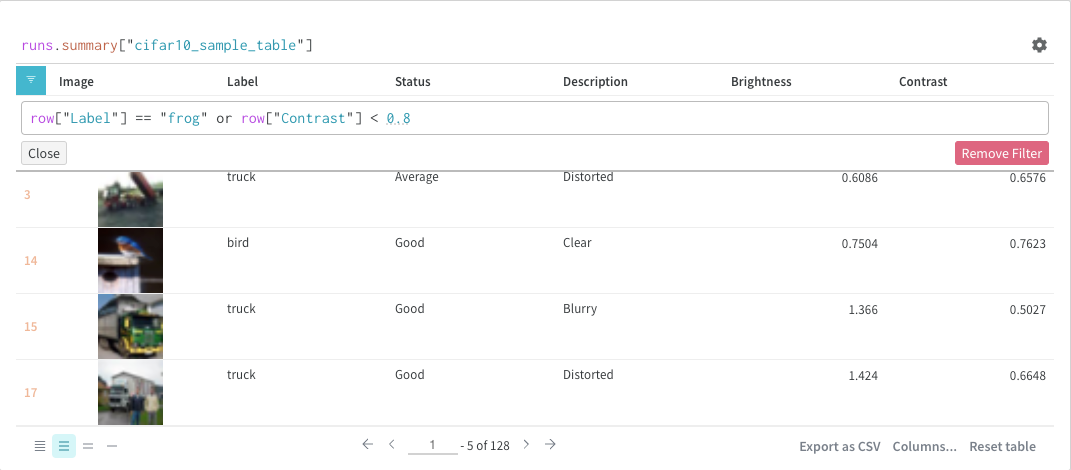
クエリ内で直接、または左上隅のフィルターボタンを使用してフィルターできます(2枚目の画像)。
### フィルター
クエリ内で直接、または左上隅のフィルターボタンを使用してフィルターできます(2枚目の画像)。
 ### マップ
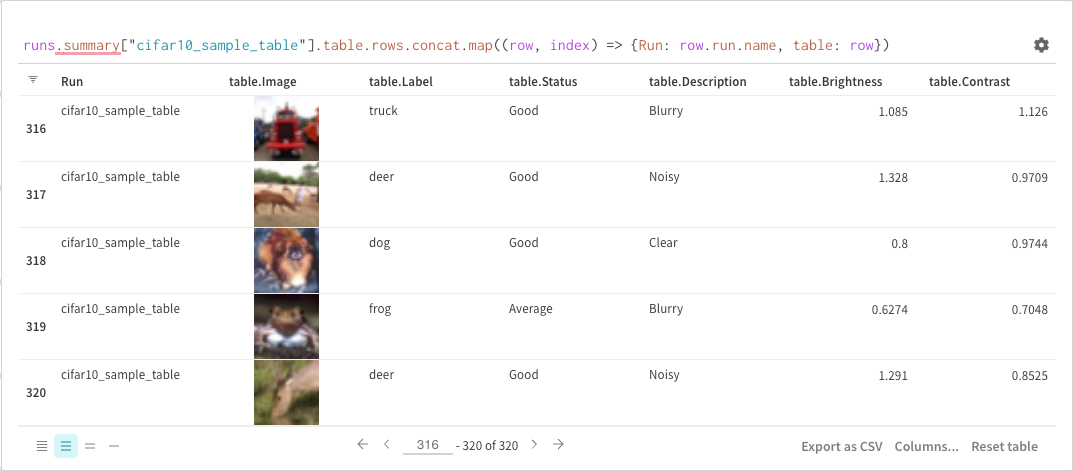
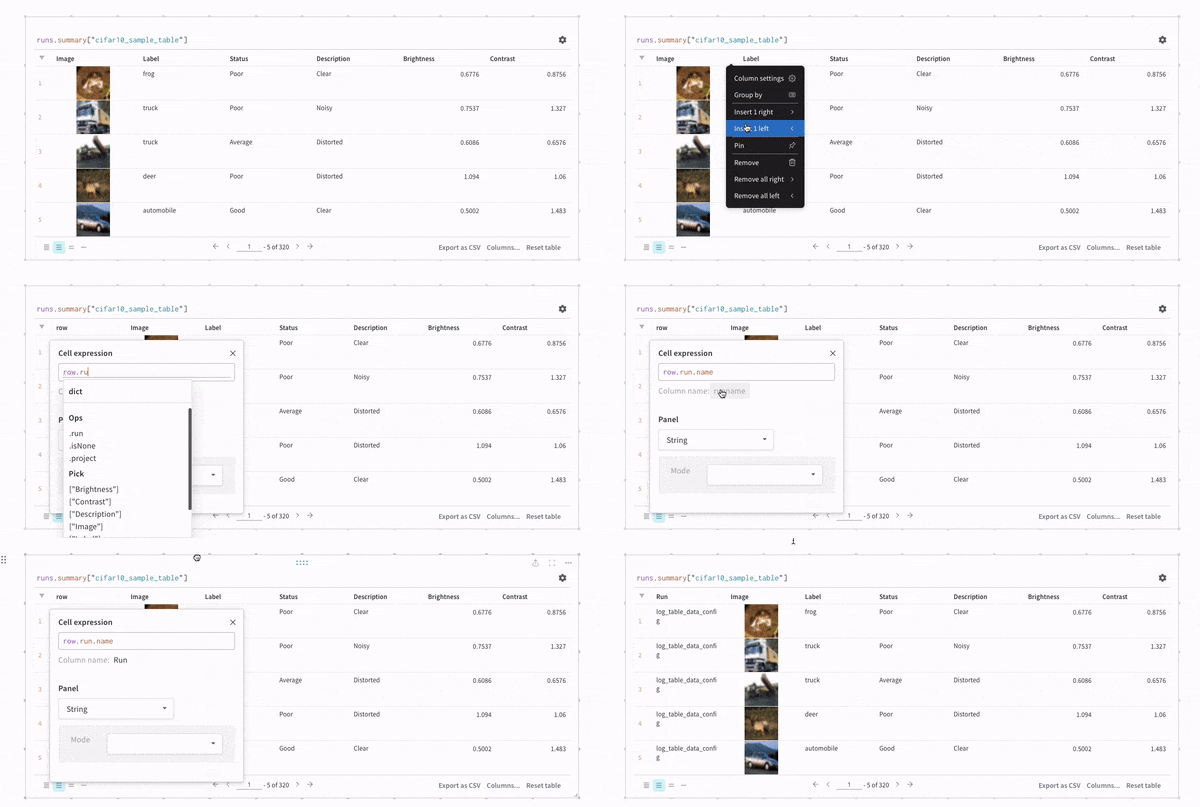
マップ操作はリストを反復し、データ内の各要素に関数を適用します。これは、パネルクエリを使用して直接行うことも、列オプションから新しい列を挿入することによって行うこともできます。
### マップ
マップ操作はリストを反復し、データ内の各要素に関数を適用します。これは、パネルクエリを使用して直接行うことも、列オプションから新しい列を挿入することによって行うこともできます。
 ### グループ化
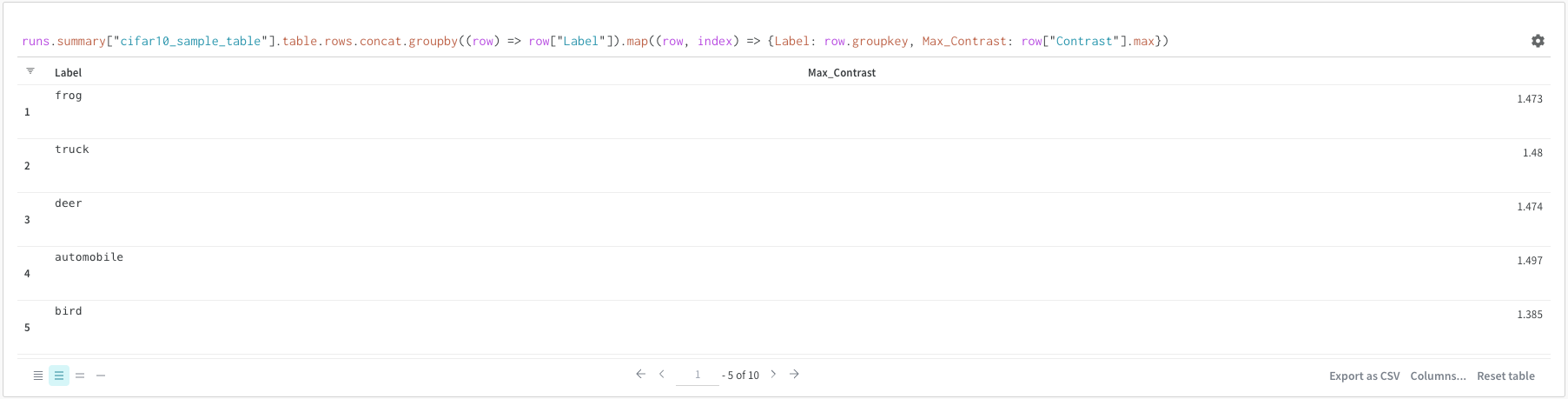
クエリを使用してまたは列オプションからグループ化できます。
### グループ化
クエリを使用してまたは列オプションからグループ化できます。
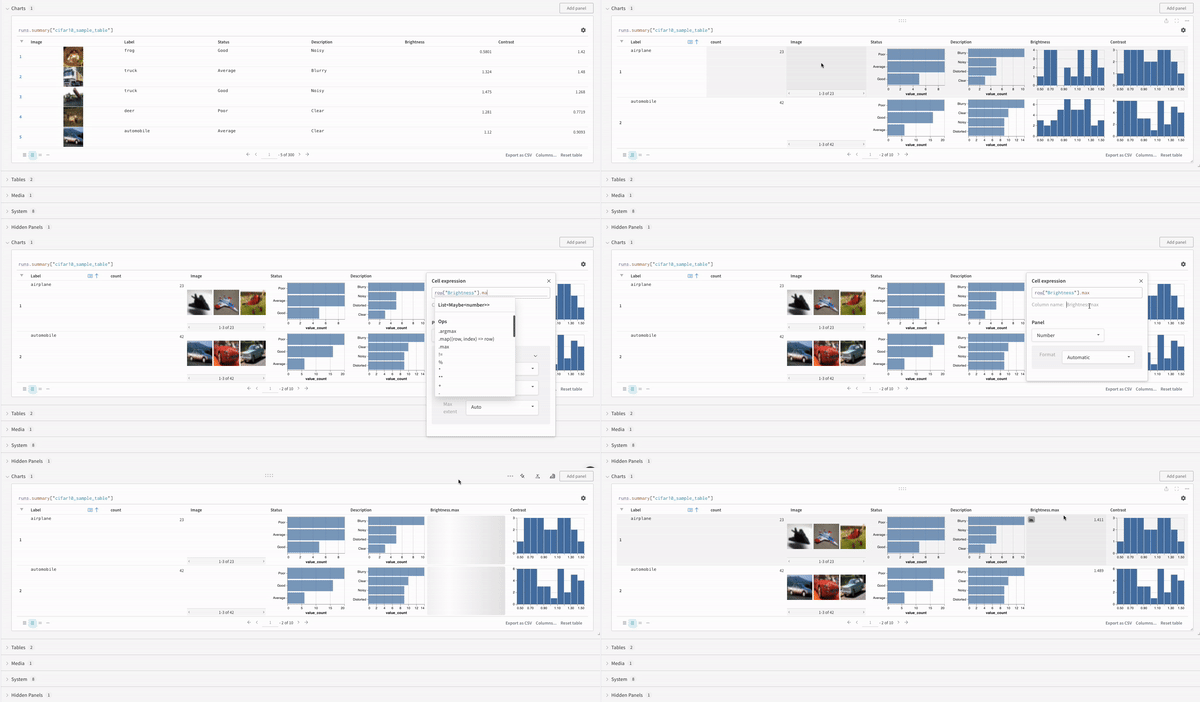 ### 連結
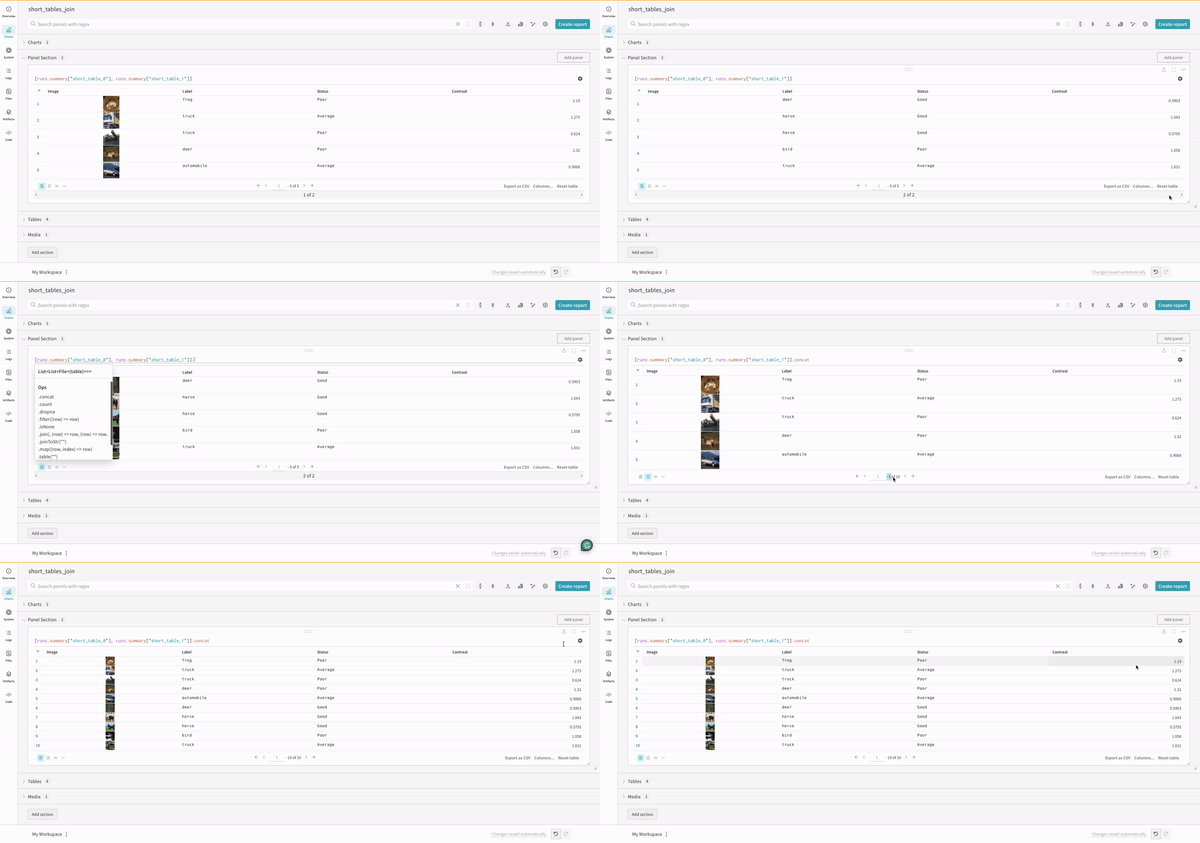
連結操作により、2つのテーブルを連結し、パネル設定から連結または結合できます。
### 連結
連結操作により、2つのテーブルを連結し、パネル設定から連結または結合できます。
 ### 結合
クエリ内でテーブルを直接結合することも可能です。次のクエリ式を考えてみてください:
```python theme={null}
project("luis_team_test", "weave_example_queries").runs.summary["short_table_0"].table.rows.concat.join(\
project("luis_team_test", "weave_example_queries").runs.summary["short_table_1"].table.rows.concat,\
(row) => row["Label"],(row) => row["Label"], "Table1", "Table2",\
"false", "false")
```
### 結合
クエリ内でテーブルを直接結合することも可能です。次のクエリ式を考えてみてください:
```python theme={null}
project("luis_team_test", "weave_example_queries").runs.summary["short_table_0"].table.rows.concat.join(\
project("luis_team_test", "weave_example_queries").runs.summary["short_table_1"].table.rows.concat,\
(row) => row["Label"],(row) => row["Label"], "Table1", "Table2",\
"false", "false")
```
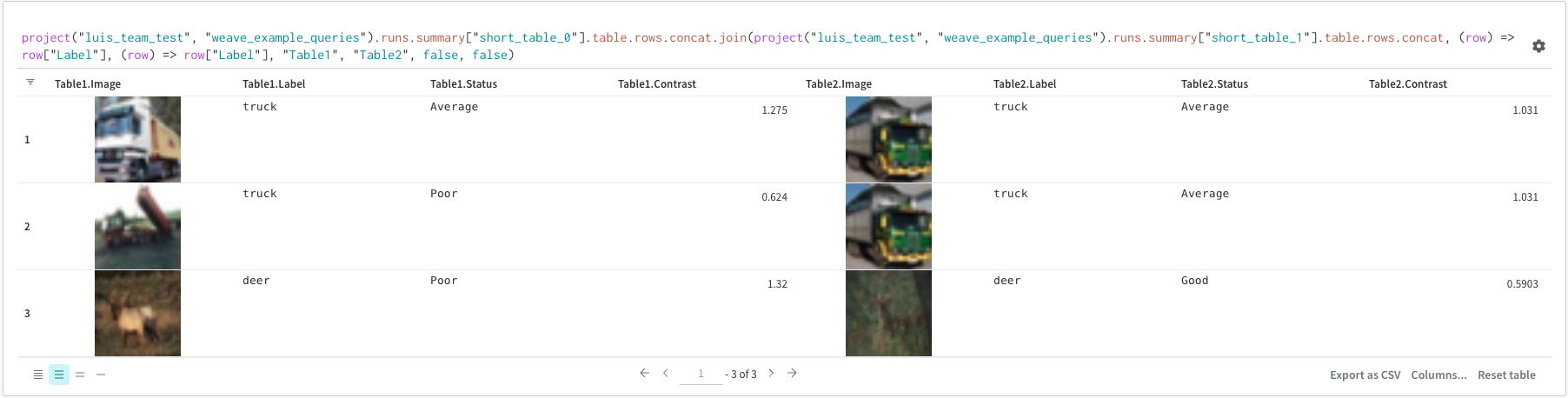 左のテーブルは次のように生成されます:
```python theme={null}
project("luis_team_test", "weave_example_queries").\
runs.summary["short_table_0"].table.rows.concat.join
```
右のテーブルは次のように生成されます:
```python theme={null}
project("luis_team_test", "weave_example_queries").\
runs.summary["short_table_1"].table.rows.concat
```
ここで:
* `(row) => row["Label"]` は各テーブルのセレクタであり、結合する列を決定します
* `"Table1"` と `"Table2"` は、結合された各テーブルの名前です
* `true` と `false` は、左および右の内/外部結合設定です
## Runsオブジェクト
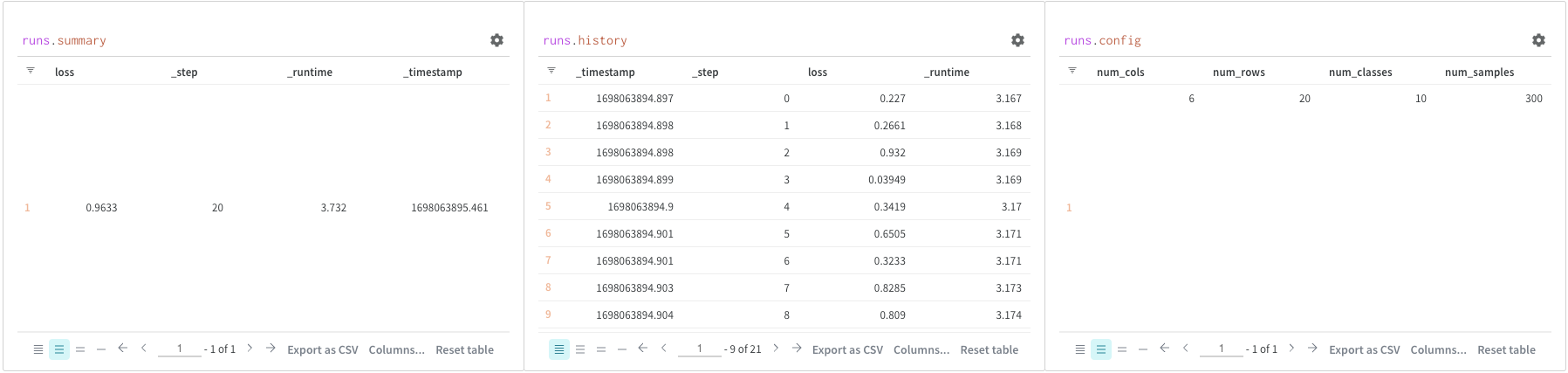
クエリパネルを使用して `runs` オブジェクトにアクセスします。Runオブジェクトは、実験の記録を保存します。詳細については、[こちらのレポート](https://wandb.ai/luis_team_test/weave_example_queries/reports/Weave-queries---Vmlldzo1NzIxOTY2?accessToken=bvzq5hwooare9zy790yfl3oitutbvno2i6c2s81gk91750m53m2hdclj0jvryhcr#3.-accessing-runs-object)のセクションを参照してくださいが、簡単な概要として、`runs` オブジェクトには以下が含まれます:
* `summary`: Runの結果を要約する情報の辞書です。精度や損失のようなスカラーや、大きなファイルを含むことができます。デフォルトでは、`wandb.log()`は記録された時系列の最終的な値をsummaryに設定します。直接summaryの内容を設定することもできます。summaryはRunの出力と考えてください。
* `history`: モデルがトレーニング中に変化する値を格納するための辞書のリストです。コマンド `wandb.log()` はこのオブジェクトに追加します。
* `config`: Runの設定情報を含む辞書で、トレーニングランのハイパーパラメーターやデータセットアーティファクトを作成するランの前処理方法などが含まれます。これらはRunの「入力」として考えてください。
左のテーブルは次のように生成されます:
```python theme={null}
project("luis_team_test", "weave_example_queries").\
runs.summary["short_table_0"].table.rows.concat.join
```
右のテーブルは次のように生成されます:
```python theme={null}
project("luis_team_test", "weave_example_queries").\
runs.summary["short_table_1"].table.rows.concat
```
ここで:
* `(row) => row["Label"]` は各テーブルのセレクタであり、結合する列を決定します
* `"Table1"` と `"Table2"` は、結合された各テーブルの名前です
* `true` と `false` は、左および右の内/外部結合設定です
## Runsオブジェクト
クエリパネルを使用して `runs` オブジェクトにアクセスします。Runオブジェクトは、実験の記録を保存します。詳細については、[こちらのレポート](https://wandb.ai/luis_team_test/weave_example_queries/reports/Weave-queries---Vmlldzo1NzIxOTY2?accessToken=bvzq5hwooare9zy790yfl3oitutbvno2i6c2s81gk91750m53m2hdclj0jvryhcr#3.-accessing-runs-object)のセクションを参照してくださいが、簡単な概要として、`runs` オブジェクトには以下が含まれます:
* `summary`: Runの結果を要約する情報の辞書です。精度や損失のようなスカラーや、大きなファイルを含むことができます。デフォルトでは、`wandb.log()`は記録された時系列の最終的な値をsummaryに設定します。直接summaryの内容を設定することもできます。summaryはRunの出力と考えてください。
* `history`: モデルがトレーニング中に変化する値を格納するための辞書のリストです。コマンド `wandb.log()` はこのオブジェクトに追加します。
* `config`: Runの設定情報を含む辞書で、トレーニングランのハイパーパラメーターやデータセットアーティファクトを作成するランの前処理方法などが含まれます。これらはRunの「入力」として考えてください。
 ## Artifactsにアクセスする
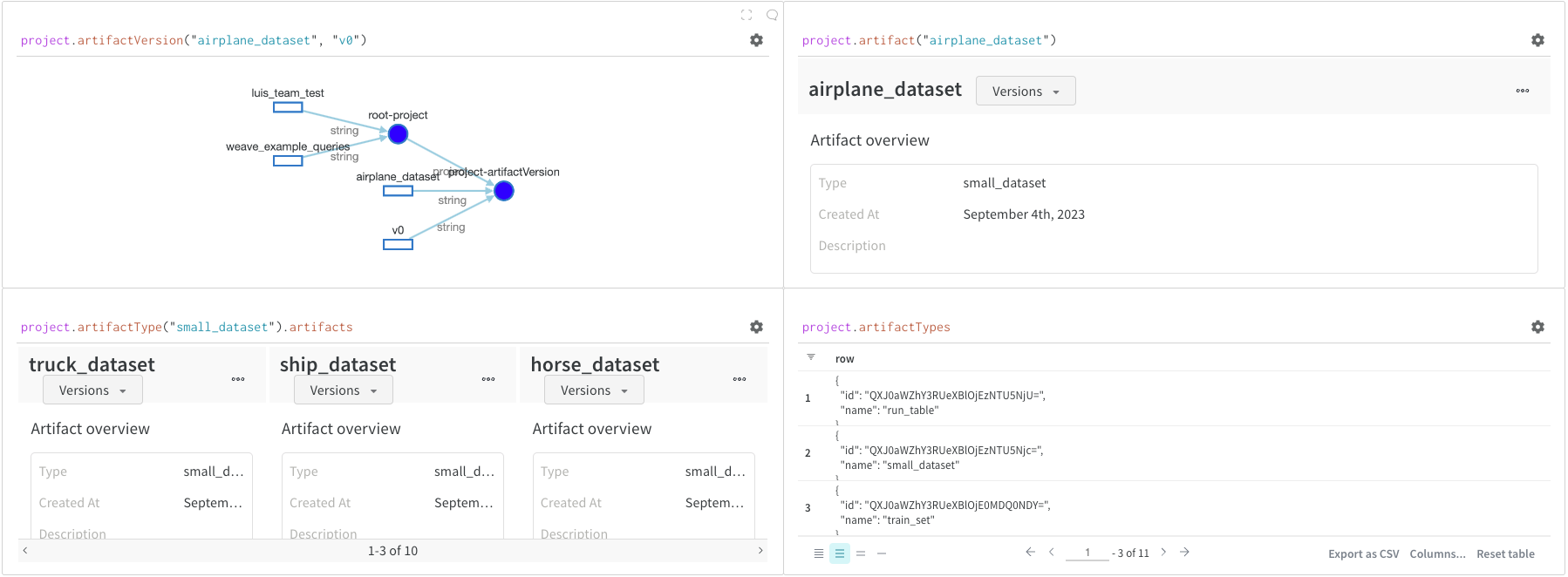
Artifacts は W\&B の中核概念です。これは、バージョン管理された名前付きファイルやディレクトリーのコレクションです。Artifacts を使用して、モデルの重み、データセット、およびその他のファイルやディレクトリーを追跡します。Artifacts は W\&B に保存され、他の runs でダウンロードまたは使用できます。詳細と例は、[こちらのセクション](https://wandb.ai/luis_team_test/weave_example_queries/reports/Weave-queries---Vmlldzo1NzIxOTY2?accessToken=bvzq5hwooare9zy790yfl3oitutbvno2i6c2s81gk91750m53m2hdclj0jvryhcr#4.-accessing-artifacts)のレポートで確認できます。Artifacts は通常、`project` オブジェクトからアクセスします:
* `project.artifactVersion()`: プロジェクト内の特定の名前とバージョンのアーティファクトバージョンを返します
* `project.artifact("")`: プロジェクト内の特定の名前のアーティファクトを返します。その後、`.versions` を使用してこのアーティファクトのすべてのバージョンのリストを取得できます
* `project.artifactType()`: プロジェクト内の特定の名前の `artifactType` を返します。その後、`.artifacts` を使用して、このタイプを持つすべてのアーティファクトのリストを取得できます
* `project.artifactTypes`: プロジェクト内のすべてのアーティファクトタイプのリストを返します
## Artifactsにアクセスする
Artifacts は W\&B の中核概念です。これは、バージョン管理された名前付きファイルやディレクトリーのコレクションです。Artifacts を使用して、モデルの重み、データセット、およびその他のファイルやディレクトリーを追跡します。Artifacts は W\&B に保存され、他の runs でダウンロードまたは使用できます。詳細と例は、[こちらのセクション](https://wandb.ai/luis_team_test/weave_example_queries/reports/Weave-queries---Vmlldzo1NzIxOTY2?accessToken=bvzq5hwooare9zy790yfl3oitutbvno2i6c2s81gk91750m53m2hdclj0jvryhcr#4.-accessing-artifacts)のレポートで確認できます。Artifacts は通常、`project` オブジェクトからアクセスします:
* `project.artifactVersion()`: プロジェクト内の特定の名前とバージョンのアーティファクトバージョンを返します
* `project.artifact("")`: プロジェクト内の特定の名前のアーティファクトを返します。その後、`.versions` を使用してこのアーティファクトのすべてのバージョンのリストを取得できます
* `project.artifactType()`: プロジェクト内の特定の名前の `artifactType` を返します。その後、`.artifacts` を使用して、このタイプを持つすべてのアーティファクトのリストを取得できます
* `project.artifactTypes`: プロジェクト内のすべてのアーティファクトタイプのリストを返します