> ## Documentation Index
> Fetch the complete documentation index at: https://wb-21fd5541-docs-1778-mysql-updates.mintlify.site/llms.txt
> Use this file to discover all available pages before exploring further.
> How to download a model with W&B Python SDK
# Download a model version
Use the W\&B Python SDK to download a model artifact that you linked to the Model Registry.
You are responsible for providing additional Python functions, API calls to reconstruct, deserialize your model into a form that you can work with.
W\&B suggests that you document information on how to load models into memory with model cards. For more information, see the [Document machine learning models](./create-model-cards) page.
Replace values within `<>` with your own:
```python theme={null}
import wandb
# Initialize a run
with wandb.init(project="", entity="") as run:
# Access and download model. Returns path to downloaded artifact
downloaded_model_path = run.use_model(name="")
```
Reference a model version with one of following formats listed:
* `latest` - Use `latest` alias to specify the model version that is most recently linked.
* `v#` - Use `v0`, `v1`, `v2`, and so on to fetch a specific version in the Registered Model
* `alias` - Specify the custom alias that you and your team assigned to your model version
See [`use_model`](/models/ref/python/experiments/run#use_model) in the API Reference guide for more information on possible parameters and return type.
Example: Download and use a logged model
For example, in the proceeding code snippet a user called the `use_model` API. They specified the name of the model artifact they want to fetch and they also provided a version/alias. They then stored the path that returned from the API to the `downloaded_model_path` variable.
```python theme={null}
import wandb
entity = "luka"
project = "NLP_Experiments"
alias = "latest" # semantic nickname or identifier for the model version
model_artifact_name = "fine-tuned-model"
# Initialize a run
with wandb.init() as run:
# Access and download model. Returns path to downloaded artifact
downloaded_model_path = run.use_model(name=f"{entity/project/model_artifact_name}:{alias}")
```
**Planned deprecation for W\&B Model Registry in 2024**
The proceeding tabs demonstrate how to consume model artifacts using the soon to be deprecated Model Registry.
Use the W\&B Registry to track, organize and consume model artifacts. For more information see the [Registry docs](/models/registry/).
Replace values within `<>` with your own:
```python theme={null}
import wandb
# Initialize a run
with wandb.init(project="", entity="") as run:
# Access and download model. Returns path to downloaded artifact
downloaded_model_path = run.use_model(name="")
```
Reference a model version with one of following formats listed:
* `latest` - Use `latest` alias to specify the model version that is most recently linked.
* `v#` - Use `v0`, `v1`, `v2`, and so on to fetch a specific version in the Registered Model
* `alias` - Specify the custom alias that you and your team assigned to your model version
See [`use_model`](/models/ref/python/experiments/run#use_model) in the API Reference guide for parameters and return type.
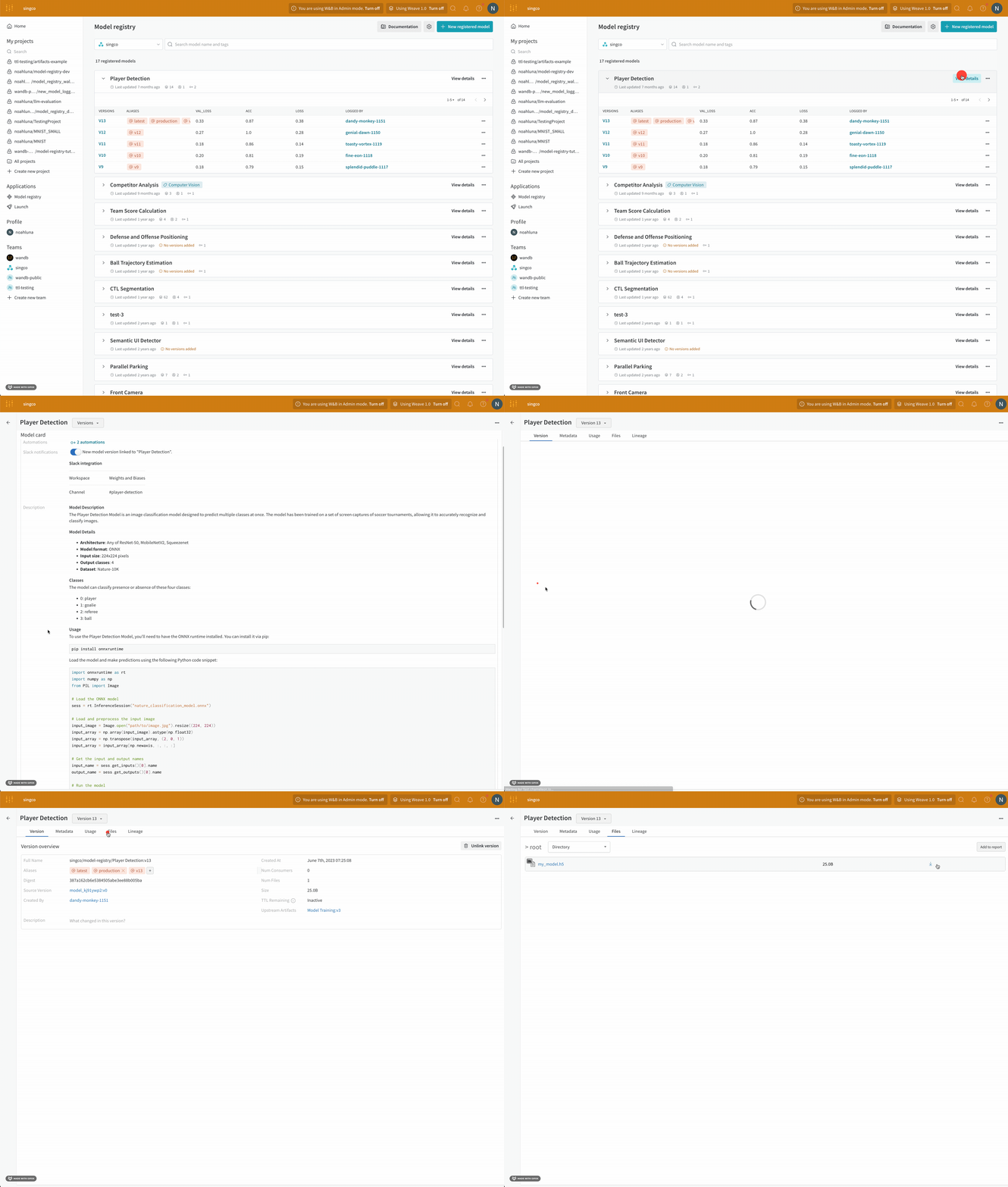
1. Navigate to the [Model Registry](https://wandb.ai/registry/model).
2. Select **View details** next to the name of the registered model that contains the model you want to download.
3. Within the Versions section, select the View button next to the model version you want to download.
4. Select the **Files** tab.
5. Click on the download button next to the model file you want to download.