> ## Documentation Index
> Fetch the complete documentation index at: https://wb-21fd5541-docs-1778-mysql-updates.mintlify.site/llms.txt
> Use this file to discover all available pages before exploring further.
# TensorFlow
export const ColabLink = ({url}) =>
Try in Colab
;
## What this notebook covers
* Easy integration of W\&B with your TensorFlow pipeline for experiment tracking.
* Computing metrics with `keras.metrics`
* Using `wandb.log` to log those metrics in your custom training loop.
**Note**: Sections starting with *Step* are all you need to integrate W\&B into existing code. The rest is just a standard MNIST example.
```python theme={null}
import os
import matplotlib.pyplot as plt
import numpy as np
import pandas as pd
import tensorflow as tf
from tensorflow import keras
from tensorflow.keras.datasets import cifar10
```
## Install, Import, Login
### Install W\&B
```jupyter theme={null}
%%capture
!pip install wandb
```
### Import W\&B and login
```python theme={null}
import wandb
from wandb.integration.keras import WandbMetricsLogger
wandb.login()
```
> Side note: If this is your first time using W\&B or you are not logged in, the link that appears after running `wandb.login()` will take you to sign-up/login page. Signing up is as easy as one click.
### Prepare Dataset
```python theme={null}
# Prepare the training dataset
BATCH_SIZE = 64
(x_train, y_train), (x_test, y_test) = keras.datasets.mnist.load_data()
x_train = np.reshape(x_train, (-1, 784))
x_test = np.reshape(x_test, (-1, 784))
# build input pipeline using tf.data
train_dataset = tf.data.Dataset.from_tensor_slices((x_train, y_train))
train_dataset = train_dataset.shuffle(buffer_size=1024).batch(BATCH_SIZE)
val_dataset = tf.data.Dataset.from_tensor_slices((x_test, y_test))
val_dataset = val_dataset.batch(BATCH_SIZE)
```
## Define the Model and the Training Loop
```python theme={null}
def make_model():
inputs = keras.Input(shape=(784,), name="digits")
x1 = keras.layers.Dense(64, activation="relu")(inputs)
x2 = keras.layers.Dense(64, activation="relu")(x1)
outputs = keras.layers.Dense(10, name="predictions")(x2)
return keras.Model(inputs=inputs, outputs=outputs)
```
```python theme={null}
def train_step(x, y, model, optimizer, loss_fn, train_acc_metric):
with tf.GradientTape() as tape:
logits = model(x, training=True)
loss_value = loss_fn(y, logits)
grads = tape.gradient(loss_value, model.trainable_weights)
optimizer.apply_gradients(zip(grads, model.trainable_weights))
train_acc_metric.update_state(y, logits)
return loss_value
```
```python theme={null}
def test_step(x, y, model, loss_fn, val_acc_metric):
val_logits = model(x, training=False)
loss_value = loss_fn(y, val_logits)
val_acc_metric.update_state(y, val_logits)
return loss_value
```
## Add `wandb.log` to your training loop
```python theme={null}
def train(
train_dataset,
val_dataset,
model,
optimizer,
train_acc_metric,
val_acc_metric,
epochs=10,
log_step=200,
val_log_step=50,
):
run = wandb.init(
project="my-tf-integration",
config={
"epochs": epochs,
"log_step": log_step,
"val_log_step": val_log_step,
"architecture": "MLP",
"dataset": "MNIST",
},
)
for epoch in range(epochs):
print("\nStart of epoch %d" % (epoch,))
train_loss = []
val_loss = []
# Iterate over the batches of the dataset
for step, (x_batch_train, y_batch_train) in enumerate(train_dataset):
loss_value = train_step(
x_batch_train,
y_batch_train,
model,
optimizer,
loss_fn,
train_acc_metric,
)
train_loss.append(float(loss_value))
# Run a validation loop at the end of each epoch
for step, (x_batch_val, y_batch_val) in enumerate(val_dataset):
val_loss_value = test_step(
x_batch_val, y_batch_val, model, loss_fn, val_acc_metric
)
val_loss.append(float(val_loss_value))
# Display metrics at the end of each epoch
train_acc = train_acc_metric.result()
print("Training acc over epoch: %.4f" % (float(train_acc),))
val_acc = val_acc_metric.result()
print("Validation acc: %.4f" % (float(val_acc),))
# Reset metrics at the end of each epoch
train_acc_metric.reset_state()
val_acc_metric.reset_state()
# Log metrics using run.log()
run.log(
{
"epochs": epoch,
"loss": np.mean(train_loss),
"acc": float(train_acc),
"val_loss": np.mean(val_loss),
"val_acc": float(val_acc),
}
)
run.finish()
```
## Run Training
### Call `wandb.init()` to start a run
This lets us know you're launching an experiment,
so we can give it a unique ID and a dashboard.
[Check out the official documentation](/models/ref/python/functions/init)
```python theme={null}
# initialize wandb with your project name and optionally with configuration.
# play around with the config values and see the result on your wandb dashboard.
config = {
"learning_rate": 0.001,
"epochs": 10,
"batch_size": 64,
"log_step": 200,
"val_log_step": 50,
"architecture": "CNN",
"dataset": "CIFAR-10",
}
run = wandb.init(project='my-tf-integration', config=config)
config = run.config
# Initialize model.
model = make_model()
# Instantiate an optimizer to train the model.
optimizer = keras.optimizers.SGD(learning_rate=config.learning_rate)
# Instantiate a loss function.
loss_fn = keras.losses.SparseCategoricalCrossentropy(from_logits=True)
# Prepare the metrics.
train_acc_metric = keras.metrics.SparseCategoricalAccuracy()
val_acc_metric = keras.metrics.SparseCategoricalAccuracy()
train(
train_dataset,
val_dataset,
model,
optimizer,
train_acc_metric,
val_acc_metric,
epochs=config.epochs,
log_step=config.log_step,
val_log_step=config.val_log_step,
)
run.finish() # In Jupyter/Colab, let us know you're finished!
```
### Visualize Results
Click on the [run page](/models/runs/#view-logged-runs) link above to see your live results.
## Sweep 101
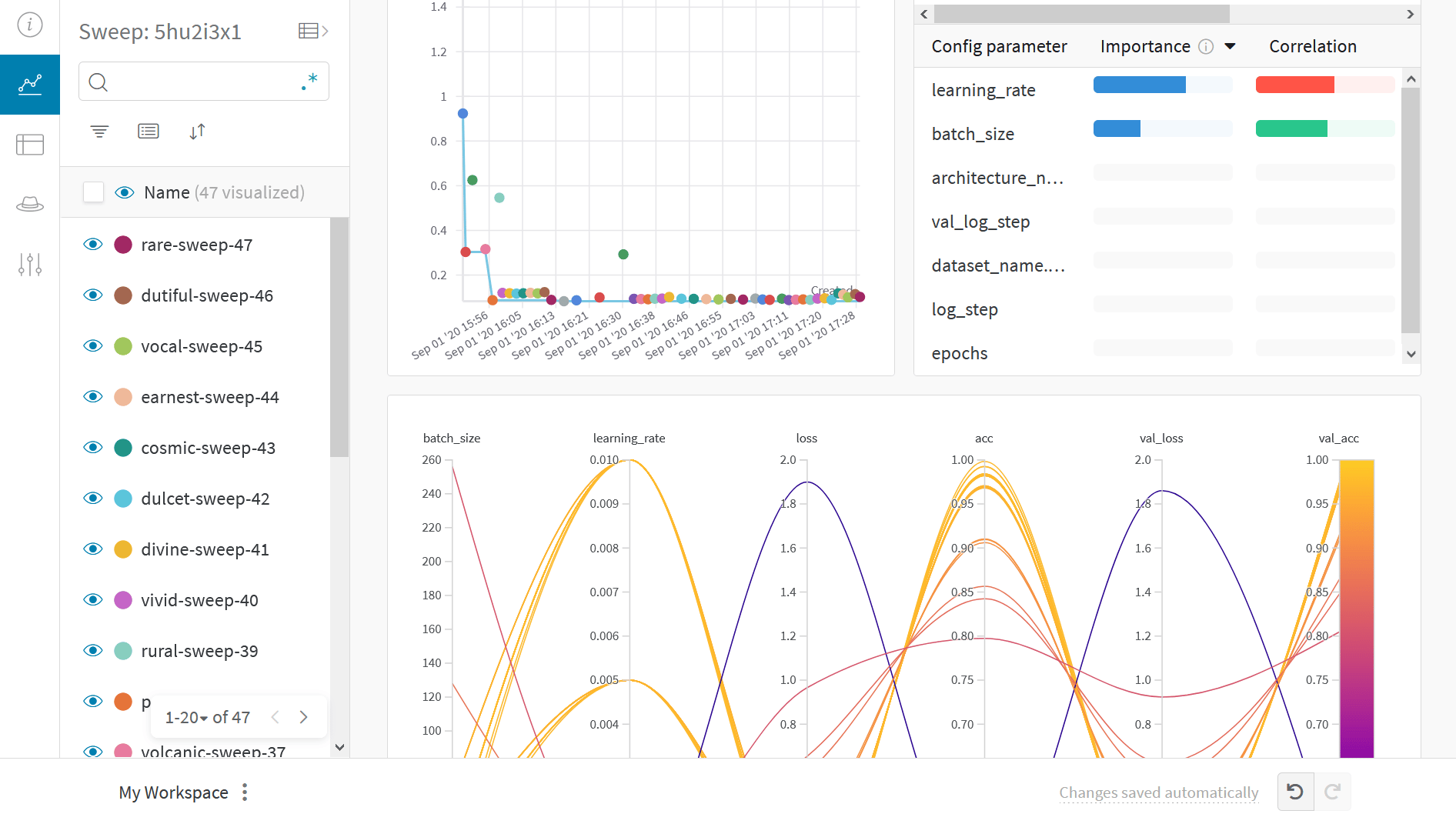
Use W\&B Sweeps to automate hyperparameter optimization and explore the space of possible models.
Check out a [Colab notebook demonstrating hyperparameter optimization using W\&B Sweeps](https://wandb.me/tf-sweeps-colab)
### Benefits of using W\&B Sweeps
* **Quick setup**: With just a few lines of code you can run W\&B Sweeps.
* **Transparent**: We cite all the algorithms we're using, and [our code is open source](https://github.com/wandb/sweeps).
* **Powerful**: Our sweeps are completely customizable and configurable. You can launch a sweep across dozens of machines, and it's just as easy as starting a sweep on your laptop.
## Example Gallery
Explore examples of projects tracked and visualized with W\&B in our gallery of examples, [Fully Connected →](https://wandb.me/fc).
## Best Practices
1. **Projects**: Log multiple runs to a project to compare them. `wandb.init(project="project-name")`
2. **Groups**: For multiple processes or cross validation folds, log each process as a runs and group them together. `wandb.init(group="experiment-1")`
3. **Tags**: Add tags to track your current baseline or production model.
4. **Notes**: Type notes in the table to track the changes between runs.
5. **Reports**: Take quick notes on progress to share with colleagues and make dashboards and snapshots of your ML projects.
### Advanced Setup
1. [Environment variables](/platform/hosting/env-vars/): Set API keys in environment variables so you can run training on a managed cluster.
2. [Offline mode](/models/support/run_wandb_offline/)
3. [On-prem](/platform/hosting/hosting-options/self-managed): Install W\&B in a private cloud or air-gapped servers in your own infrastructure. We have local installations for everyone from academics to enterprise teams.
4. [Artifacts](/models/artifacts/): Track and version models and datasets in a streamlined way that automatically picks up your pipeline steps as you train models.
 **Note**: Sections starting with *Step* are all you need to integrate W\&B into existing code. The rest is just a standard MNIST example.
```python theme={null}
import os
import matplotlib.pyplot as plt
import numpy as np
import pandas as pd
import tensorflow as tf
from tensorflow import keras
from tensorflow.keras.datasets import cifar10
```
## Install, Import, Login
### Install W\&B
```jupyter theme={null}
%%capture
!pip install wandb
```
### Import W\&B and login
```python theme={null}
import wandb
from wandb.integration.keras import WandbMetricsLogger
wandb.login()
```
> Side note: If this is your first time using W\&B or you are not logged in, the link that appears after running `wandb.login()` will take you to sign-up/login page. Signing up is as easy as one click.
### Prepare Dataset
```python theme={null}
# Prepare the training dataset
BATCH_SIZE = 64
(x_train, y_train), (x_test, y_test) = keras.datasets.mnist.load_data()
x_train = np.reshape(x_train, (-1, 784))
x_test = np.reshape(x_test, (-1, 784))
# build input pipeline using tf.data
train_dataset = tf.data.Dataset.from_tensor_slices((x_train, y_train))
train_dataset = train_dataset.shuffle(buffer_size=1024).batch(BATCH_SIZE)
val_dataset = tf.data.Dataset.from_tensor_slices((x_test, y_test))
val_dataset = val_dataset.batch(BATCH_SIZE)
```
## Define the Model and the Training Loop
```python theme={null}
def make_model():
inputs = keras.Input(shape=(784,), name="digits")
x1 = keras.layers.Dense(64, activation="relu")(inputs)
x2 = keras.layers.Dense(64, activation="relu")(x1)
outputs = keras.layers.Dense(10, name="predictions")(x2)
return keras.Model(inputs=inputs, outputs=outputs)
```
```python theme={null}
def train_step(x, y, model, optimizer, loss_fn, train_acc_metric):
with tf.GradientTape() as tape:
logits = model(x, training=True)
loss_value = loss_fn(y, logits)
grads = tape.gradient(loss_value, model.trainable_weights)
optimizer.apply_gradients(zip(grads, model.trainable_weights))
train_acc_metric.update_state(y, logits)
return loss_value
```
```python theme={null}
def test_step(x, y, model, loss_fn, val_acc_metric):
val_logits = model(x, training=False)
loss_value = loss_fn(y, val_logits)
val_acc_metric.update_state(y, val_logits)
return loss_value
```
## Add `wandb.log` to your training loop
```python theme={null}
def train(
train_dataset,
val_dataset,
model,
optimizer,
train_acc_metric,
val_acc_metric,
epochs=10,
log_step=200,
val_log_step=50,
):
run = wandb.init(
project="my-tf-integration",
config={
"epochs": epochs,
"log_step": log_step,
"val_log_step": val_log_step,
"architecture": "MLP",
"dataset": "MNIST",
},
)
for epoch in range(epochs):
print("\nStart of epoch %d" % (epoch,))
train_loss = []
val_loss = []
# Iterate over the batches of the dataset
for step, (x_batch_train, y_batch_train) in enumerate(train_dataset):
loss_value = train_step(
x_batch_train,
y_batch_train,
model,
optimizer,
loss_fn,
train_acc_metric,
)
train_loss.append(float(loss_value))
# Run a validation loop at the end of each epoch
for step, (x_batch_val, y_batch_val) in enumerate(val_dataset):
val_loss_value = test_step(
x_batch_val, y_batch_val, model, loss_fn, val_acc_metric
)
val_loss.append(float(val_loss_value))
# Display metrics at the end of each epoch
train_acc = train_acc_metric.result()
print("Training acc over epoch: %.4f" % (float(train_acc),))
val_acc = val_acc_metric.result()
print("Validation acc: %.4f" % (float(val_acc),))
# Reset metrics at the end of each epoch
train_acc_metric.reset_state()
val_acc_metric.reset_state()
# Log metrics using run.log()
run.log(
{
"epochs": epoch,
"loss": np.mean(train_loss),
"acc": float(train_acc),
"val_loss": np.mean(val_loss),
"val_acc": float(val_acc),
}
)
run.finish()
```
## Run Training
### Call `wandb.init()` to start a run
This lets us know you're launching an experiment,
so we can give it a unique ID and a dashboard.
[Check out the official documentation](/models/ref/python/functions/init)
```python theme={null}
# initialize wandb with your project name and optionally with configuration.
# play around with the config values and see the result on your wandb dashboard.
config = {
"learning_rate": 0.001,
"epochs": 10,
"batch_size": 64,
"log_step": 200,
"val_log_step": 50,
"architecture": "CNN",
"dataset": "CIFAR-10",
}
run = wandb.init(project='my-tf-integration', config=config)
config = run.config
# Initialize model.
model = make_model()
# Instantiate an optimizer to train the model.
optimizer = keras.optimizers.SGD(learning_rate=config.learning_rate)
# Instantiate a loss function.
loss_fn = keras.losses.SparseCategoricalCrossentropy(from_logits=True)
# Prepare the metrics.
train_acc_metric = keras.metrics.SparseCategoricalAccuracy()
val_acc_metric = keras.metrics.SparseCategoricalAccuracy()
train(
train_dataset,
val_dataset,
model,
optimizer,
train_acc_metric,
val_acc_metric,
epochs=config.epochs,
log_step=config.log_step,
val_log_step=config.val_log_step,
)
run.finish() # In Jupyter/Colab, let us know you're finished!
```
### Visualize Results
Click on the [run page](/models/runs/#view-logged-runs) link above to see your live results.
## Sweep 101
Use W\&B Sweeps to automate hyperparameter optimization and explore the space of possible models.
Check out a [Colab notebook demonstrating hyperparameter optimization using W\&B Sweeps](https://wandb.me/tf-sweeps-colab)
### Benefits of using W\&B Sweeps
* **Quick setup**: With just a few lines of code you can run W\&B Sweeps.
* **Transparent**: We cite all the algorithms we're using, and [our code is open source](https://github.com/wandb/sweeps).
* **Powerful**: Our sweeps are completely customizable and configurable. You can launch a sweep across dozens of machines, and it's just as easy as starting a sweep on your laptop.
**Note**: Sections starting with *Step* are all you need to integrate W\&B into existing code. The rest is just a standard MNIST example.
```python theme={null}
import os
import matplotlib.pyplot as plt
import numpy as np
import pandas as pd
import tensorflow as tf
from tensorflow import keras
from tensorflow.keras.datasets import cifar10
```
## Install, Import, Login
### Install W\&B
```jupyter theme={null}
%%capture
!pip install wandb
```
### Import W\&B and login
```python theme={null}
import wandb
from wandb.integration.keras import WandbMetricsLogger
wandb.login()
```
> Side note: If this is your first time using W\&B or you are not logged in, the link that appears after running `wandb.login()` will take you to sign-up/login page. Signing up is as easy as one click.
### Prepare Dataset
```python theme={null}
# Prepare the training dataset
BATCH_SIZE = 64
(x_train, y_train), (x_test, y_test) = keras.datasets.mnist.load_data()
x_train = np.reshape(x_train, (-1, 784))
x_test = np.reshape(x_test, (-1, 784))
# build input pipeline using tf.data
train_dataset = tf.data.Dataset.from_tensor_slices((x_train, y_train))
train_dataset = train_dataset.shuffle(buffer_size=1024).batch(BATCH_SIZE)
val_dataset = tf.data.Dataset.from_tensor_slices((x_test, y_test))
val_dataset = val_dataset.batch(BATCH_SIZE)
```
## Define the Model and the Training Loop
```python theme={null}
def make_model():
inputs = keras.Input(shape=(784,), name="digits")
x1 = keras.layers.Dense(64, activation="relu")(inputs)
x2 = keras.layers.Dense(64, activation="relu")(x1)
outputs = keras.layers.Dense(10, name="predictions")(x2)
return keras.Model(inputs=inputs, outputs=outputs)
```
```python theme={null}
def train_step(x, y, model, optimizer, loss_fn, train_acc_metric):
with tf.GradientTape() as tape:
logits = model(x, training=True)
loss_value = loss_fn(y, logits)
grads = tape.gradient(loss_value, model.trainable_weights)
optimizer.apply_gradients(zip(grads, model.trainable_weights))
train_acc_metric.update_state(y, logits)
return loss_value
```
```python theme={null}
def test_step(x, y, model, loss_fn, val_acc_metric):
val_logits = model(x, training=False)
loss_value = loss_fn(y, val_logits)
val_acc_metric.update_state(y, val_logits)
return loss_value
```
## Add `wandb.log` to your training loop
```python theme={null}
def train(
train_dataset,
val_dataset,
model,
optimizer,
train_acc_metric,
val_acc_metric,
epochs=10,
log_step=200,
val_log_step=50,
):
run = wandb.init(
project="my-tf-integration",
config={
"epochs": epochs,
"log_step": log_step,
"val_log_step": val_log_step,
"architecture": "MLP",
"dataset": "MNIST",
},
)
for epoch in range(epochs):
print("\nStart of epoch %d" % (epoch,))
train_loss = []
val_loss = []
# Iterate over the batches of the dataset
for step, (x_batch_train, y_batch_train) in enumerate(train_dataset):
loss_value = train_step(
x_batch_train,
y_batch_train,
model,
optimizer,
loss_fn,
train_acc_metric,
)
train_loss.append(float(loss_value))
# Run a validation loop at the end of each epoch
for step, (x_batch_val, y_batch_val) in enumerate(val_dataset):
val_loss_value = test_step(
x_batch_val, y_batch_val, model, loss_fn, val_acc_metric
)
val_loss.append(float(val_loss_value))
# Display metrics at the end of each epoch
train_acc = train_acc_metric.result()
print("Training acc over epoch: %.4f" % (float(train_acc),))
val_acc = val_acc_metric.result()
print("Validation acc: %.4f" % (float(val_acc),))
# Reset metrics at the end of each epoch
train_acc_metric.reset_state()
val_acc_metric.reset_state()
# Log metrics using run.log()
run.log(
{
"epochs": epoch,
"loss": np.mean(train_loss),
"acc": float(train_acc),
"val_loss": np.mean(val_loss),
"val_acc": float(val_acc),
}
)
run.finish()
```
## Run Training
### Call `wandb.init()` to start a run
This lets us know you're launching an experiment,
so we can give it a unique ID and a dashboard.
[Check out the official documentation](/models/ref/python/functions/init)
```python theme={null}
# initialize wandb with your project name and optionally with configuration.
# play around with the config values and see the result on your wandb dashboard.
config = {
"learning_rate": 0.001,
"epochs": 10,
"batch_size": 64,
"log_step": 200,
"val_log_step": 50,
"architecture": "CNN",
"dataset": "CIFAR-10",
}
run = wandb.init(project='my-tf-integration', config=config)
config = run.config
# Initialize model.
model = make_model()
# Instantiate an optimizer to train the model.
optimizer = keras.optimizers.SGD(learning_rate=config.learning_rate)
# Instantiate a loss function.
loss_fn = keras.losses.SparseCategoricalCrossentropy(from_logits=True)
# Prepare the metrics.
train_acc_metric = keras.metrics.SparseCategoricalAccuracy()
val_acc_metric = keras.metrics.SparseCategoricalAccuracy()
train(
train_dataset,
val_dataset,
model,
optimizer,
train_acc_metric,
val_acc_metric,
epochs=config.epochs,
log_step=config.log_step,
val_log_step=config.val_log_step,
)
run.finish() # In Jupyter/Colab, let us know you're finished!
```
### Visualize Results
Click on the [run page](/models/runs/#view-logged-runs) link above to see your live results.
## Sweep 101
Use W\&B Sweeps to automate hyperparameter optimization and explore the space of possible models.
Check out a [Colab notebook demonstrating hyperparameter optimization using W\&B Sweeps](https://wandb.me/tf-sweeps-colab)
### Benefits of using W\&B Sweeps
* **Quick setup**: With just a few lines of code you can run W\&B Sweeps.
* **Transparent**: We cite all the algorithms we're using, and [our code is open source](https://github.com/wandb/sweeps).
* **Powerful**: Our sweeps are completely customizable and configurable. You can launch a sweep across dozens of machines, and it's just as easy as starting a sweep on your laptop.
 ## Example Gallery
Explore examples of projects tracked and visualized with W\&B in our gallery of examples, [Fully Connected →](https://wandb.me/fc).
## Best Practices
1. **Projects**: Log multiple runs to a project to compare them. `wandb.init(project="project-name")`
2. **Groups**: For multiple processes or cross validation folds, log each process as a runs and group them together. `wandb.init(group="experiment-1")`
3. **Tags**: Add tags to track your current baseline or production model.
4. **Notes**: Type notes in the table to track the changes between runs.
5. **Reports**: Take quick notes on progress to share with colleagues and make dashboards and snapshots of your ML projects.
### Advanced Setup
1. [Environment variables](/platform/hosting/env-vars/): Set API keys in environment variables so you can run training on a managed cluster.
2. [Offline mode](/models/support/run_wandb_offline/)
3. [On-prem](/platform/hosting/hosting-options/self-managed): Install W\&B in a private cloud or air-gapped servers in your own infrastructure. We have local installations for everyone from academics to enterprise teams.
4. [Artifacts](/models/artifacts/): Track and version models and datasets in a streamlined way that automatically picks up your pipeline steps as you train models.
## Example Gallery
Explore examples of projects tracked and visualized with W\&B in our gallery of examples, [Fully Connected →](https://wandb.me/fc).
## Best Practices
1. **Projects**: Log multiple runs to a project to compare them. `wandb.init(project="project-name")`
2. **Groups**: For multiple processes or cross validation folds, log each process as a runs and group them together. `wandb.init(group="experiment-1")`
3. **Tags**: Add tags to track your current baseline or production model.
4. **Notes**: Type notes in the table to track the changes between runs.
5. **Reports**: Take quick notes on progress to share with colleagues and make dashboards and snapshots of your ML projects.
### Advanced Setup
1. [Environment variables](/platform/hosting/env-vars/): Set API keys in environment variables so you can run training on a managed cluster.
2. [Offline mode](/models/support/run_wandb_offline/)
3. [On-prem](/platform/hosting/hosting-options/self-managed): Install W\&B in a private cloud or air-gapped servers in your own infrastructure. We have local installations for everyone from academics to enterprise teams.
4. [Artifacts](/models/artifacts/): Track and version models and datasets in a streamlined way that automatically picks up your pipeline steps as you train models.