> ## Documentation Index
> Fetch the complete documentation index at: https://wb-21fd5541-docs-1778-mysql-updates.mintlify.site/llms.txt
> Use this file to discover all available pages before exploring further.
# TensorFlow Sweeps
export const ColabLink = ({url}) =>
Try in Colab
;
Use W\&B for machine learning experiment tracking, dataset versioning, and project collaboration.
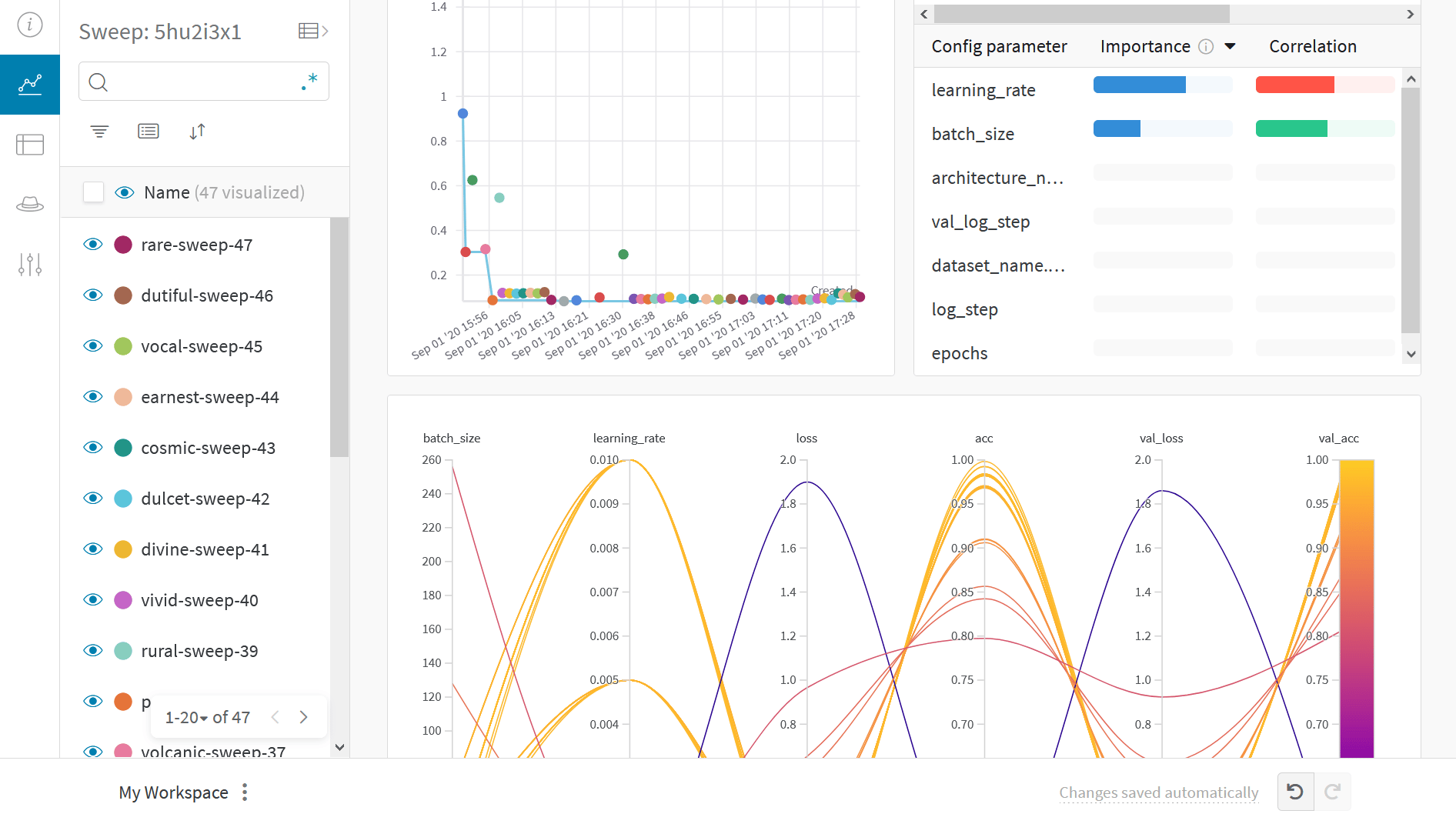
Use W\&B Sweeps to automate hyperparameter optimization and explore model possibilities with interactive dashboards:
## Why use sweeps
* **Quick setup**: Run W\&B sweeps with a few lines of code.
* **Transparent**: The project cites all algorithms used, and the [code is open source](https://github.com/wandb/wandb/blob/main/wandb/apis/public/sweeps.py).
* **Powerful**: Sweeps provide customization options and can run on multiple machines or a laptop with ease.
For more information, see the [Sweeps overview](/models/sweeps/).
## What this notebook covers
* Steps to start with W\&B Sweep and a custom training loop in TensorFlow.
* Finding best hyperparameters for image classification tasks.
**Note**: Sections starting with *Step* show necessary code to perform a hyperparameter sweep. The rest sets up a simple example.
## Install, import, and log in
### Install W\&B
```bash theme={null}
pip install wandb
```
### Import W\&B and log in
```python theme={null}
import tqdm
import tensorflow as tf
from tensorflow import keras
from tensorflow.keras.datasets import cifar10
import os
import numpy as np
import pandas as pd
import matplotlib.pyplot as plt
```
```python theme={null}
import wandb
from wandb.integration.keras import WandbMetricsLogger
wandb.login()
```
If you are new to W\&B or not logged in, the link after running `wandb.login()` directs to the sign-up/login page.
## Prepare dataset
```python theme={null}
# Prepare the training dataset
(x_train, y_train), (x_test, y_test) = keras.datasets.mnist.load_data()
x_train = x_train / 255.0
x_test = x_test / 255.0
x_train = np.reshape(x_train, (-1, 784))
x_test = np.reshape(x_test, (-1, 784))
```
## Build a classifier MLP
```python theme={null}
def Model():
inputs = keras.Input(shape=(784,), name="digits")
x1 = keras.layers.Dense(64, activation="relu")(inputs)
x2 = keras.layers.Dense(64, activation="relu")(x1)
outputs = keras.layers.Dense(10, name="predictions")(x2)
return keras.Model(inputs=inputs, outputs=outputs)
def train_step(x, y, model, optimizer, loss_fn, train_acc_metric):
with tf.GradientTape() as tape:
logits = model(x, training=True)
loss_value = loss_fn(y, logits)
grads = tape.gradient(loss_value, model.trainable_weights)
optimizer.apply_gradients(zip(grads, model.trainable_weights))
train_acc_metric.update_state(y, logits)
return loss_value
def test_step(x, y, model, loss_fn, val_acc_metric):
val_logits = model(x, training=False)
loss_value = loss_fn(y, val_logits)
val_acc_metric.update_state(y, val_logits)
return loss_value
```
## Write a training loop
```python theme={null}
def train(
train_dataset,
val_dataset,
model,
optimizer,
loss_fn,
train_acc_metric,
val_acc_metric,
epochs=10,
log_step=200,
val_log_step=50,
):
run = wandb.init(
project="sweeps-tensorflow",
job_type="train",
config={
"epochs": epochs,
"log_step": log_step,
"val_log_step": val_log_step,
"architecture_name": "MLP",
"dataset_name": "MNIST",
},
)
for epoch in range(epochs):
print("\nStart of epoch %d" % (epoch,))
train_loss = []
val_loss = []
# Iterate over the batches of the dataset
for step, (x_batch_train, y_batch_train) in tqdm.tqdm(
enumerate(train_dataset), total=len(train_dataset)
):
loss_value = train_step(
x_batch_train,
y_batch_train,
model,
optimizer,
loss_fn,
train_acc_metric,
)
train_loss.append(float(loss_value))
# Run a validation loop at the end of each epoch
for step, (x_batch_val, y_batch_val) in enumerate(val_dataset):
val_loss_value = test_step(
x_batch_val, y_batch_val, model, loss_fn, val_acc_metric
)
val_loss.append(float(val_loss_value))
# Display metrics at the end of each epoch
train_acc = train_acc_metric.result()
print("Training acc over epoch: %.4f" % (float(train_acc),))
val_acc = val_acc_metric.result()
print("Validation acc: %.4f" % (float(val_acc),))
# Reset metrics at the end of each epoch
train_acc_metric.reset_states()
val_acc_metric.reset_states()
# 3. Log metrics using run.log()
run.log(
{
"epochs": epoch,
"loss": np.mean(train_loss),
"acc": float(train_acc),
"val_loss": np.mean(val_loss),
"val_acc": float(val_acc),
}
)
run.finish()
```
## Configure the sweep
Steps to configure the sweep:
* Define the hyperparameters to optimize
* Choose the optimization method: `random`, `grid`, or `bayes`
* Set a goal and metric for `bayes`, like minimizing `val_loss`
* Use `hyperband` for early termination of performing runs
See more in the [sweep configuration guide](/models/sweeps/define-sweep-configuration/).
```python theme={null}
sweep_config = {
"method": "random",
"metric": {"name": "val_loss", "goal": "minimize"},
"early_terminate": {"type": "hyperband", "min_iter": 5},
"parameters": {
"batch_size": {"values": [32, 64, 128, 256]},
"learning_rate": {"values": [0.01, 0.005, 0.001, 0.0005, 0.0001]},
},
}
```
## Wrap the training loop
Create a function, like `sweep_train`,
which uses `run.config()` to set hyperparameters before calling `train`.
```python theme={null}
def sweep_train(config_defaults=None):
# Set default values
config_defaults = {"batch_size": 64, "learning_rate": 0.01}
# Initialize wandb with a sample project name
run = wandb.init(config=config_defaults) # this gets over-written in the Sweep
# Specify the other hyperparameters to the configuration, if any
run.config.epochs = 2
run.config.log_step = 20
run.config.val_log_step = 50
run.config.architecture_name = "MLP"
run.config.dataset_name = "MNIST"
# build input pipeline using tf.data
train_dataset = tf.data.Dataset.from_tensor_slices((x_train, y_train))
train_dataset = (
train_dataset.shuffle(buffer_size=1024)
.batch(run.config.batch_size)
.prefetch(buffer_size=tf.data.AUTOTUNE)
)
val_dataset = tf.data.Dataset.from_tensor_slices((x_test, y_test))
val_dataset = val_dataset.batch(run.config.batch_size).prefetch(
buffer_size=tf.data.AUTOTUNE
)
# initialize model
model = Model()
# Instantiate an optimizer to train the model.
optimizer = keras.optimizers.SGD(learning_rate=run.config.learning_rate)
# Instantiate a loss function.
loss_fn = keras.losses.SparseCategoricalCrossentropy(from_logits=True)
# Prepare the metrics.
train_acc_metric = keras.metrics.SparseCategoricalAccuracy()
val_acc_metric = keras.metrics.SparseCategoricalAccuracy()
train(
train_dataset,
val_dataset,
model,
optimizer,
loss_fn,
train_acc_metric,
val_acc_metric,
epochs=run.config.epochs,
log_step=run.config.log_step,
val_log_step=run.config.val_log_step,
)
run.finish()
```
## Initialize sweep and run personal digital assistant
```python theme={null}
sweep_id = wandb.sweep(sweep_config, project="sweeps-tensorflow")
```
Limit the number of runs with the `count` parameter. Set to 10 for quick execution. Increase as needed.
```python theme={null}
wandb.agent(sweep_id, function=sweep_train, count=10)
```
## Visualize results
Click on the **Sweep URL** link preceding to view live results.
## Example gallery
Explore projects tracked and visualized with W\&B in the [Gallery](https://app.wandb.ai/gallery).
## Best practices
1. **Projects**: Log multiple runs to a project to compare them. `wandb.init(project="project-name")`
2. **Groups**: Log each process as a run for multiple processes or cross-validation folds, and group them. `wandb.init(group='experiment-1')`
3. **Tags**: Use tags to track your baseline or production model.
4. **Notes**: Enter notes in the table to track changes between runs.
5. **Reports**: Use reports for progress notes, sharing with colleagues, and creating ML project dashboards and snapshots.
## Advanced setup
1. [Environment variables](/platform/hosting/env-vars/): Set API keys for training on a managed cluster.
2. [Offline mode](/models/support/run_wandb_offline/)
3. [On-prem](/platform/hosting/hosting-options/self-managed): Install W\&B in a private cloud or air-gapped servers in your infrastructure. Local installations suit academics and enterprise teams.
 Use W\&B Sweeps to automate hyperparameter optimization and explore model possibilities with interactive dashboards:
 ## Why use sweeps
* **Quick setup**: Run W\&B sweeps with a few lines of code.
* **Transparent**: The project cites all algorithms used, and the [code is open source](https://github.com/wandb/wandb/blob/main/wandb/apis/public/sweeps.py).
* **Powerful**: Sweeps provide customization options and can run on multiple machines or a laptop with ease.
For more information, see the [Sweeps overview](/models/sweeps/).
## What this notebook covers
* Steps to start with W\&B Sweep and a custom training loop in TensorFlow.
* Finding best hyperparameters for image classification tasks.
**Note**: Sections starting with *Step* show necessary code to perform a hyperparameter sweep. The rest sets up a simple example.
## Install, import, and log in
### Install W\&B
```bash theme={null}
pip install wandb
```
### Import W\&B and log in
```python theme={null}
import tqdm
import tensorflow as tf
from tensorflow import keras
from tensorflow.keras.datasets import cifar10
import os
import numpy as np
import pandas as pd
import matplotlib.pyplot as plt
```
```python theme={null}
import wandb
from wandb.integration.keras import WandbMetricsLogger
wandb.login()
```
## Why use sweeps
* **Quick setup**: Run W\&B sweeps with a few lines of code.
* **Transparent**: The project cites all algorithms used, and the [code is open source](https://github.com/wandb/wandb/blob/main/wandb/apis/public/sweeps.py).
* **Powerful**: Sweeps provide customization options and can run on multiple machines or a laptop with ease.
For more information, see the [Sweeps overview](/models/sweeps/).
## What this notebook covers
* Steps to start with W\&B Sweep and a custom training loop in TensorFlow.
* Finding best hyperparameters for image classification tasks.
**Note**: Sections starting with *Step* show necessary code to perform a hyperparameter sweep. The rest sets up a simple example.
## Install, import, and log in
### Install W\&B
```bash theme={null}
pip install wandb
```
### Import W\&B and log in
```python theme={null}
import tqdm
import tensorflow as tf
from tensorflow import keras
from tensorflow.keras.datasets import cifar10
import os
import numpy as np
import pandas as pd
import matplotlib.pyplot as plt
```
```python theme={null}
import wandb
from wandb.integration.keras import WandbMetricsLogger
wandb.login()
```