> ## Documentation Index
> Fetch the complete documentation index at: https://wb-21fd5541-docs-1778-mysql-updates.mintlify.site/llms.txt
> Use this file to discover all available pages before exploring further.
# Weave and Models integration demo
export const ColabLink = ({url}) =>
Try in Colab
;
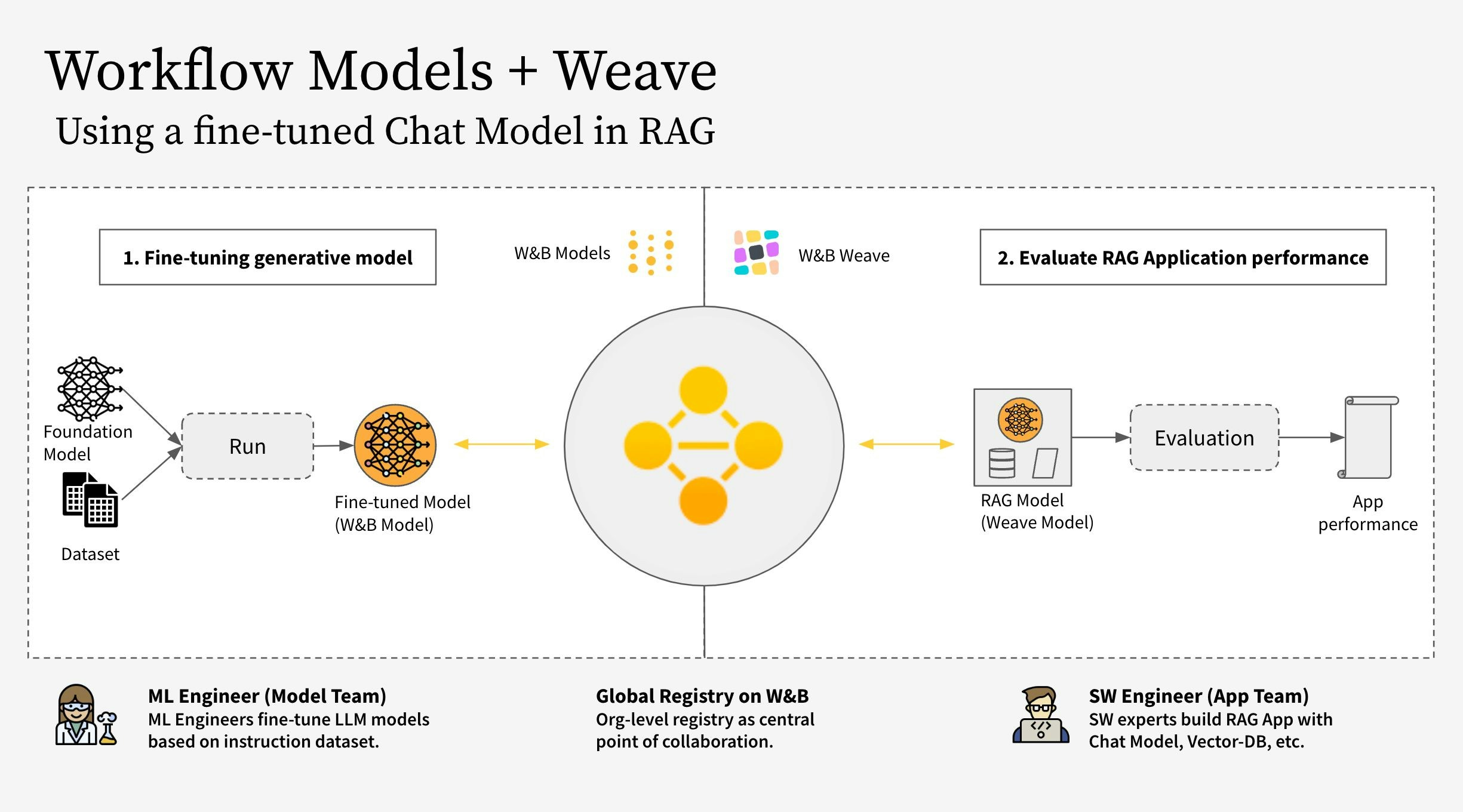
This notebook shows how to use W\&B Weave together with W\&B Models. Specifically, this example considers two different teams.
* **The Model Team:** the model building team fine-tunes a new Chat Model (Llama 3.2) and saves it to the registry using **W\&B Models**.
* **The App Team:** the app development team retrieves the Chat Model to create and evaluate a new RAG chatbot using **W\&B Weave**.
Find the public workspace for both W\&B Models and W\&B Weave [here](https://wandb.ai/wandb-smle/weave-cookboook-demo/weave/evaluations).
The workflow covers the following steps:
1. Instrument the RAG app code with W\&B Weave
2. Fine-tune an LLM (such as Llama 3.2, but you can replace it with any other LLM) and track it with W\&B Models
3. Log the fine-tuned model to the [W\&B Registry](https://docs.wandb.ai/guides/core/registry)
4. Implement the RAG app with the new fine-tuned model and evaluate the app with W\&B Weave
5. Once satisfied with the results, save a reference to the updated Rag app in the W\&B Registry
**Note:**
The `RagModel` referenced below is top-level `weave.Model` that you can consider a complete RAG app. It contains a `ChatModel`, Vector database, and a Prompt. The `ChatModel` is also another `weave.Model` which contains the code to download an artifact from the W\&B Registry and it can change to support any other chat model as part of the `RagModel`. For more details see [the complete model on Weave](https://wandb.ai/wandb-smle/weave-cookboook-demo/weave/evaluations?peekPath=%2Fwandb-smle%2Fweave-cookboook-demo%2Fobjects%2FRagModel%2Fversions%2Fx7MzcgHDrGXYHHDQ9BA8N89qDwcGkdSdpxH30ubm8ZM%3F%26).
## 1. Setup
First, install `weave` and `wandb`, then log in with an API key. You can create and view your API keys at [https://wandb.ai/settings](https://wandb.ai/settings).
```bash theme={null}
pip install weave wandb
```
```python theme={null}
import wandb
import weave
import pandas as pd
PROJECT = "weave-cookboook-demo"
ENTITY = "wandb-smle"
wandb.login()
weave.init(ENTITY + "/" + PROJECT)
```
## 2. Make `ChatModel` based on Artifact
Retrieve the fine-tuned chat model from the Registry and create a `weave.Model` from it to directly plug into the [`RagModel`](https://wandb.ai/wandb-smle/weave-cookboook-demo/weave/object-versions?filter=%7B%22objectName%22%3A%22RagModel%22%7D\&peekPath=%2Fwandb-smle%2Fweave-cookboook-demo%2Fobjects%2FRagModel%2Fversions%2FcqRaGKcxutBWXyM0fCGTR1Yk2mISLsNari4wlGTwERo%3F%26) in the next step. It takes in the same parameters as the existing [ChatModel](https://wandb.ai/wandb-smle/weave-cookboook-demo/weave/object-versions?filter=%7B%22objectName%22%3A%22RagModel%22%7D\&peekPath=%2Fwandb-smle%2Fweave-rag-experiments%2Fobjects%2FChatModelRag%2Fversions%2F2mhdPb667uoFlXStXtZ0MuYoxPaiAXj3KyLS1kYRi84%3F%26) just the `init` and `predict` change.
```bash theme={null}
pip install unsloth
pip uninstall unsloth -y && pip install --upgrade --no-cache-dir "unsloth[colab-new] @ git+https://github.com/unslothai/unsloth.git"
```
The model team fine-tuned different Llama-3.2 models using the `unsloth` library to make it faster. Hence use the special `unsloth.FastLanguageModel` or `peft.AutoPeftModelForCausalLM` models with adapters to load in the model once downloaded from the Registry. Copy the loading code from the "Use" tab in the Registry and paste it into `model_post_init`.
```python theme={null}
import weave
from pydantic import PrivateAttr
from typing import Any, List, Dict, Optional
from unsloth import FastLanguageModel
import torch
class UnslothLoRAChatModel(weave.Model):
"""
Define an extra ChatModel class to store and version more parameters than just the model name.
This enables fine-tuning on specific parameters.
"""
chat_model: str
cm_temperature: float
cm_max_new_tokens: int
cm_quantize: bool
inference_batch_size: int
dtype: Any
device: str
_model: Any = PrivateAttr()
_tokenizer: Any = PrivateAttr()
def model_post_init(self, __context):
run = wandb.init(project=PROJECT, job_type="model_download")
artifact_ref = self.chat_model.replace("wandb-artifact://", "")
artifact = run.use_artifact(artifact_ref)
model_path = artifact.download()
# unsloth version (enable native 2x faster inference)
self._model, self._tokenizer = FastLanguageModel.from_pretrained(
model_name=model_path,
max_seq_length=self.cm_max_new_tokens,
dtype=self.dtype,
load_in_4bit=self.cm_quantize,
)
FastLanguageModel.for_inference(self._model)
@weave.op()
async def predict(self, query: List[str]) -> dict:
# add_generation_prompt = true - Must add for generation
input_ids = self._tokenizer.apply_chat_template(
query,
tokenize=True,
add_generation_prompt=True,
return_tensors="pt",
).to("cuda")
output_ids = self._model.generate(
input_ids=input_ids,
max_new_tokens=64,
use_cache=True,
temperature=1.5,
min_p=0.1,
)
decoded_outputs = self._tokenizer.batch_decode(
output_ids[0][input_ids.shape[1] :], skip_special_tokens=True
)
return "".join(decoded_outputs).strip()
```
Now create a new model with a specific link from the registry:
```python theme={null}
ORG_ENTITY = "wandb32" # replace this with your organization name
artifact_name = "Finetuned Llama-3.2" # replace this with your artifact name
MODEL_REG_URL = f"wandb-artifact://{ORG_ENTITY}/wandb-registry-RAG Chat Models/{artifact_name}:v3"
max_seq_length = 2048
dtype = None
load_in_4bit = True
new_chat_model = UnslothLoRAChatModel(
name="UnslothLoRAChatModelRag",
chat_model=MODEL_REG_URL,
cm_temperature=1.0,
cm_max_new_tokens=max_seq_length,
cm_quantize=load_in_4bit,
inference_batch_size=max_seq_length,
dtype=dtype,
device="auto",
)
```
And finally run the evaluation asynchronously:
```python theme={null}
await new_chat_model.predict(
[{"role": "user", "content": "What is the capital of Germany?"}]
)
```
## 3. Integrate new `ChatModel` version into `RagModel`
Building a RAG app from a fine-tuned chat model can provide several advantages, particularly in enhancing the performance and versatility of conversational AI systems.
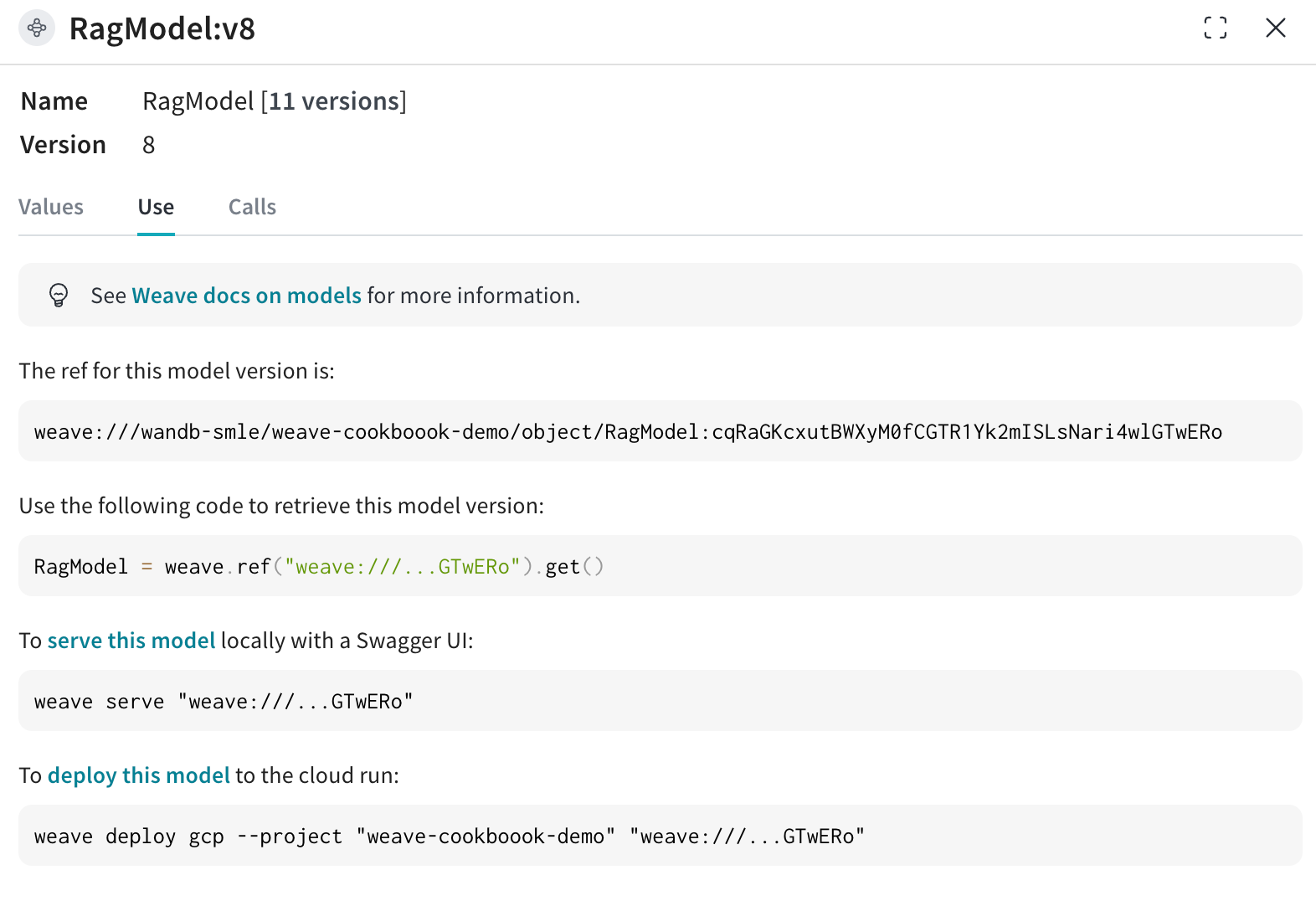
Now retrieve the [`RagModel`](https://wandb.ai/wandb-smle/weave-cookboook-demo/weave/object-versions?filter=%7B%22objectName%22%3A%22RagModel%22%7D\&peekPath=%2Fwandb-smle%2Fweave-cookboook-demo%2Fobjects%2FRagModel%2Fversions%2FcqRaGKcxutBWXyM0fCGTR1Yk2mISLsNari4wlGTwERo%3F%26) (you can fetch the weave ref for the current `RagModel` from the use tab as shown in the image below) from the existing Weave project and exchange the `ChatModel` to the new one. There is no need to change or re-create any of the other components (VDB, prompts, etc.)!
```bash theme={null}
pip install litellm faiss-gpu
```
```python theme={null}
RagModel = weave.ref(
"weave://wandb-smle/weave-cookboook-demo/object/RagModel:cqRaGKcxutBWXyM0fCGTR1Yk2mISLsNari4wlGTwERo"
).get()
# MAGIC: exchange chat_model and publish new version (no need to worry about other RAG components)
RagModel.chat_model = new_chat_model
# First publish the new version so that it is referenced during predictions
PUB_REFERENCE = weave.publish(RagModel, "RagModel")
await RagModel.predict("When was the first conference on climate change?")
```
## 4. Run new `weave.Evaluation` connecting to the existing models run
Finally, evaluate the new `RagModel` on the existing `weave.Evaluation`. To make the integration as easy as possible, include the following changes.
From a Models perspective:
* Getting the model from the registry creates a new `run` object which is part of the E2E lineage of the chat model
* Add the Trace ID (with current eval ID) to the run config so that the model team can click the link to go to the corresponding Weave page
From a Weave perspective:
* Save the artifact / registry link as input to the `ChatModel` (that is `RagModel`)
* Save the run.id as extra column in the traces with `weave.attributes`
```python theme={null}
# MAGIC: get an evaluation with a eval dataset and scorers and use them
WEAVE_EVAL = "weave://wandb-smle/weave-cookboook-demo/object/climate_rag_eval:ntRX6qn3Tx6w3UEVZXdhIh1BWGh7uXcQpOQnIuvnSgo"
climate_rag_eval = weave.ref(WEAVE_EVAL).get()
run = wandb.init()
with weave.attributes({"wandb-run-id": run.id}):
# use .call attribute to retrieve both the result and the call in order to save eval trace to Models
summary, call = await climate_rag_eval.evaluate.call(climate_rag_eval, ` RagModel `)
```
## 5. Save the new RAG model on the Registry
In order to effectively share the new RAG Model, push it to the Registry as a reference artifact adding in the weave version as an alias.
```python theme={null}
MODELS_OBJECT_VERSION = PUB_REFERENCE.digest # weave object version
MODELS_OBJECT_NAME = PUB_REFERENCE.name # weave object name
models_url = f"https://wandb.ai/{ENTITY}/{PROJECT}/weave/objects/{MODELS_OBJECT_NAME}/versions/{MODELS_OBJECT_VERSION}"
models_link = (
f"weave://{ENTITY}/{PROJECT}/object/{MODELS_OBJECT_NAME}:{MODELS_OBJECT_VERSION}"
)
with wandb.init(project=PROJECT, entity=ENTITY) as run:
# create new Artifact
artifact_model = wandb.Artifact(
name="RagModel",
type="model",
description="Models Link from RagModel in Weave",
metadata={"url": models_url},
)
artifact_model.add_reference(models_link, name="model", checksum=False)
# log new artifact
run.log_artifact(artifact_model, aliases=[MODELS_OBJECT_VERSION])
# link to registry
run.link_artifact(
artifact_model, target_path="wandb32/wandb-registry-RAG Models/RAG Model"
)
```
 The workflow covers the following steps:
1. Instrument the RAG app code with W\&B Weave
2. Fine-tune an LLM (such as Llama 3.2, but you can replace it with any other LLM) and track it with W\&B Models
3. Log the fine-tuned model to the [W\&B Registry](https://docs.wandb.ai/guides/core/registry)
4. Implement the RAG app with the new fine-tuned model and evaluate the app with W\&B Weave
5. Once satisfied with the results, save a reference to the updated Rag app in the W\&B Registry
**Note:**
The `RagModel` referenced below is top-level `weave.Model` that you can consider a complete RAG app. It contains a `ChatModel`, Vector database, and a Prompt. The `ChatModel` is also another `weave.Model` which contains the code to download an artifact from the W\&B Registry and it can change to support any other chat model as part of the `RagModel`. For more details see [the complete model on Weave](https://wandb.ai/wandb-smle/weave-cookboook-demo/weave/evaluations?peekPath=%2Fwandb-smle%2Fweave-cookboook-demo%2Fobjects%2FRagModel%2Fversions%2Fx7MzcgHDrGXYHHDQ9BA8N89qDwcGkdSdpxH30ubm8ZM%3F%26).
## 1. Setup
First, install `weave` and `wandb`, then log in with an API key. You can create and view your API keys at [https://wandb.ai/settings](https://wandb.ai/settings).
```bash theme={null}
pip install weave wandb
```
```python theme={null}
import wandb
import weave
import pandas as pd
PROJECT = "weave-cookboook-demo"
ENTITY = "wandb-smle"
wandb.login()
weave.init(ENTITY + "/" + PROJECT)
```
## 2. Make `ChatModel` based on Artifact
Retrieve the fine-tuned chat model from the Registry and create a `weave.Model` from it to directly plug into the [`RagModel`](https://wandb.ai/wandb-smle/weave-cookboook-demo/weave/object-versions?filter=%7B%22objectName%22%3A%22RagModel%22%7D\&peekPath=%2Fwandb-smle%2Fweave-cookboook-demo%2Fobjects%2FRagModel%2Fversions%2FcqRaGKcxutBWXyM0fCGTR1Yk2mISLsNari4wlGTwERo%3F%26) in the next step. It takes in the same parameters as the existing [ChatModel](https://wandb.ai/wandb-smle/weave-cookboook-demo/weave/object-versions?filter=%7B%22objectName%22%3A%22RagModel%22%7D\&peekPath=%2Fwandb-smle%2Fweave-rag-experiments%2Fobjects%2FChatModelRag%2Fversions%2F2mhdPb667uoFlXStXtZ0MuYoxPaiAXj3KyLS1kYRi84%3F%26) just the `init` and `predict` change.
```bash theme={null}
pip install unsloth
pip uninstall unsloth -y && pip install --upgrade --no-cache-dir "unsloth[colab-new] @ git+https://github.com/unslothai/unsloth.git"
```
The model team fine-tuned different Llama-3.2 models using the `unsloth` library to make it faster. Hence use the special `unsloth.FastLanguageModel` or `peft.AutoPeftModelForCausalLM` models with adapters to load in the model once downloaded from the Registry. Copy the loading code from the "Use" tab in the Registry and paste it into `model_post_init`.
```python theme={null}
import weave
from pydantic import PrivateAttr
from typing import Any, List, Dict, Optional
from unsloth import FastLanguageModel
import torch
class UnslothLoRAChatModel(weave.Model):
"""
Define an extra ChatModel class to store and version more parameters than just the model name.
This enables fine-tuning on specific parameters.
"""
chat_model: str
cm_temperature: float
cm_max_new_tokens: int
cm_quantize: bool
inference_batch_size: int
dtype: Any
device: str
_model: Any = PrivateAttr()
_tokenizer: Any = PrivateAttr()
def model_post_init(self, __context):
run = wandb.init(project=PROJECT, job_type="model_download")
artifact_ref = self.chat_model.replace("wandb-artifact://", "")
artifact = run.use_artifact(artifact_ref)
model_path = artifact.download()
# unsloth version (enable native 2x faster inference)
self._model, self._tokenizer = FastLanguageModel.from_pretrained(
model_name=model_path,
max_seq_length=self.cm_max_new_tokens,
dtype=self.dtype,
load_in_4bit=self.cm_quantize,
)
FastLanguageModel.for_inference(self._model)
@weave.op()
async def predict(self, query: List[str]) -> dict:
# add_generation_prompt = true - Must add for generation
input_ids = self._tokenizer.apply_chat_template(
query,
tokenize=True,
add_generation_prompt=True,
return_tensors="pt",
).to("cuda")
output_ids = self._model.generate(
input_ids=input_ids,
max_new_tokens=64,
use_cache=True,
temperature=1.5,
min_p=0.1,
)
decoded_outputs = self._tokenizer.batch_decode(
output_ids[0][input_ids.shape[1] :], skip_special_tokens=True
)
return "".join(decoded_outputs).strip()
```
Now create a new model with a specific link from the registry:
```python theme={null}
ORG_ENTITY = "wandb32" # replace this with your organization name
artifact_name = "Finetuned Llama-3.2" # replace this with your artifact name
MODEL_REG_URL = f"wandb-artifact://{ORG_ENTITY}/wandb-registry-RAG Chat Models/{artifact_name}:v3"
max_seq_length = 2048
dtype = None
load_in_4bit = True
new_chat_model = UnslothLoRAChatModel(
name="UnslothLoRAChatModelRag",
chat_model=MODEL_REG_URL,
cm_temperature=1.0,
cm_max_new_tokens=max_seq_length,
cm_quantize=load_in_4bit,
inference_batch_size=max_seq_length,
dtype=dtype,
device="auto",
)
```
And finally run the evaluation asynchronously:
```python theme={null}
await new_chat_model.predict(
[{"role": "user", "content": "What is the capital of Germany?"}]
)
```
## 3. Integrate new `ChatModel` version into `RagModel`
Building a RAG app from a fine-tuned chat model can provide several advantages, particularly in enhancing the performance and versatility of conversational AI systems.
Now retrieve the [`RagModel`](https://wandb.ai/wandb-smle/weave-cookboook-demo/weave/object-versions?filter=%7B%22objectName%22%3A%22RagModel%22%7D\&peekPath=%2Fwandb-smle%2Fweave-cookboook-demo%2Fobjects%2FRagModel%2Fversions%2FcqRaGKcxutBWXyM0fCGTR1Yk2mISLsNari4wlGTwERo%3F%26) (you can fetch the weave ref for the current `RagModel` from the use tab as shown in the image below) from the existing Weave project and exchange the `ChatModel` to the new one. There is no need to change or re-create any of the other components (VDB, prompts, etc.)!
The workflow covers the following steps:
1. Instrument the RAG app code with W\&B Weave
2. Fine-tune an LLM (such as Llama 3.2, but you can replace it with any other LLM) and track it with W\&B Models
3. Log the fine-tuned model to the [W\&B Registry](https://docs.wandb.ai/guides/core/registry)
4. Implement the RAG app with the new fine-tuned model and evaluate the app with W\&B Weave
5. Once satisfied with the results, save a reference to the updated Rag app in the W\&B Registry
**Note:**
The `RagModel` referenced below is top-level `weave.Model` that you can consider a complete RAG app. It contains a `ChatModel`, Vector database, and a Prompt. The `ChatModel` is also another `weave.Model` which contains the code to download an artifact from the W\&B Registry and it can change to support any other chat model as part of the `RagModel`. For more details see [the complete model on Weave](https://wandb.ai/wandb-smle/weave-cookboook-demo/weave/evaluations?peekPath=%2Fwandb-smle%2Fweave-cookboook-demo%2Fobjects%2FRagModel%2Fversions%2Fx7MzcgHDrGXYHHDQ9BA8N89qDwcGkdSdpxH30ubm8ZM%3F%26).
## 1. Setup
First, install `weave` and `wandb`, then log in with an API key. You can create and view your API keys at [https://wandb.ai/settings](https://wandb.ai/settings).
```bash theme={null}
pip install weave wandb
```
```python theme={null}
import wandb
import weave
import pandas as pd
PROJECT = "weave-cookboook-demo"
ENTITY = "wandb-smle"
wandb.login()
weave.init(ENTITY + "/" + PROJECT)
```
## 2. Make `ChatModel` based on Artifact
Retrieve the fine-tuned chat model from the Registry and create a `weave.Model` from it to directly plug into the [`RagModel`](https://wandb.ai/wandb-smle/weave-cookboook-demo/weave/object-versions?filter=%7B%22objectName%22%3A%22RagModel%22%7D\&peekPath=%2Fwandb-smle%2Fweave-cookboook-demo%2Fobjects%2FRagModel%2Fversions%2FcqRaGKcxutBWXyM0fCGTR1Yk2mISLsNari4wlGTwERo%3F%26) in the next step. It takes in the same parameters as the existing [ChatModel](https://wandb.ai/wandb-smle/weave-cookboook-demo/weave/object-versions?filter=%7B%22objectName%22%3A%22RagModel%22%7D\&peekPath=%2Fwandb-smle%2Fweave-rag-experiments%2Fobjects%2FChatModelRag%2Fversions%2F2mhdPb667uoFlXStXtZ0MuYoxPaiAXj3KyLS1kYRi84%3F%26) just the `init` and `predict` change.
```bash theme={null}
pip install unsloth
pip uninstall unsloth -y && pip install --upgrade --no-cache-dir "unsloth[colab-new] @ git+https://github.com/unslothai/unsloth.git"
```
The model team fine-tuned different Llama-3.2 models using the `unsloth` library to make it faster. Hence use the special `unsloth.FastLanguageModel` or `peft.AutoPeftModelForCausalLM` models with adapters to load in the model once downloaded from the Registry. Copy the loading code from the "Use" tab in the Registry and paste it into `model_post_init`.
```python theme={null}
import weave
from pydantic import PrivateAttr
from typing import Any, List, Dict, Optional
from unsloth import FastLanguageModel
import torch
class UnslothLoRAChatModel(weave.Model):
"""
Define an extra ChatModel class to store and version more parameters than just the model name.
This enables fine-tuning on specific parameters.
"""
chat_model: str
cm_temperature: float
cm_max_new_tokens: int
cm_quantize: bool
inference_batch_size: int
dtype: Any
device: str
_model: Any = PrivateAttr()
_tokenizer: Any = PrivateAttr()
def model_post_init(self, __context):
run = wandb.init(project=PROJECT, job_type="model_download")
artifact_ref = self.chat_model.replace("wandb-artifact://", "")
artifact = run.use_artifact(artifact_ref)
model_path = artifact.download()
# unsloth version (enable native 2x faster inference)
self._model, self._tokenizer = FastLanguageModel.from_pretrained(
model_name=model_path,
max_seq_length=self.cm_max_new_tokens,
dtype=self.dtype,
load_in_4bit=self.cm_quantize,
)
FastLanguageModel.for_inference(self._model)
@weave.op()
async def predict(self, query: List[str]) -> dict:
# add_generation_prompt = true - Must add for generation
input_ids = self._tokenizer.apply_chat_template(
query,
tokenize=True,
add_generation_prompt=True,
return_tensors="pt",
).to("cuda")
output_ids = self._model.generate(
input_ids=input_ids,
max_new_tokens=64,
use_cache=True,
temperature=1.5,
min_p=0.1,
)
decoded_outputs = self._tokenizer.batch_decode(
output_ids[0][input_ids.shape[1] :], skip_special_tokens=True
)
return "".join(decoded_outputs).strip()
```
Now create a new model with a specific link from the registry:
```python theme={null}
ORG_ENTITY = "wandb32" # replace this with your organization name
artifact_name = "Finetuned Llama-3.2" # replace this with your artifact name
MODEL_REG_URL = f"wandb-artifact://{ORG_ENTITY}/wandb-registry-RAG Chat Models/{artifact_name}:v3"
max_seq_length = 2048
dtype = None
load_in_4bit = True
new_chat_model = UnslothLoRAChatModel(
name="UnslothLoRAChatModelRag",
chat_model=MODEL_REG_URL,
cm_temperature=1.0,
cm_max_new_tokens=max_seq_length,
cm_quantize=load_in_4bit,
inference_batch_size=max_seq_length,
dtype=dtype,
device="auto",
)
```
And finally run the evaluation asynchronously:
```python theme={null}
await new_chat_model.predict(
[{"role": "user", "content": "What is the capital of Germany?"}]
)
```
## 3. Integrate new `ChatModel` version into `RagModel`
Building a RAG app from a fine-tuned chat model can provide several advantages, particularly in enhancing the performance and versatility of conversational AI systems.
Now retrieve the [`RagModel`](https://wandb.ai/wandb-smle/weave-cookboook-demo/weave/object-versions?filter=%7B%22objectName%22%3A%22RagModel%22%7D\&peekPath=%2Fwandb-smle%2Fweave-cookboook-demo%2Fobjects%2FRagModel%2Fversions%2FcqRaGKcxutBWXyM0fCGTR1Yk2mISLsNari4wlGTwERo%3F%26) (you can fetch the weave ref for the current `RagModel` from the use tab as shown in the image below) from the existing Weave project and exchange the `ChatModel` to the new one. There is no need to change or re-create any of the other components (VDB, prompts, etc.)!
 ```bash theme={null}
pip install litellm faiss-gpu
```
```python theme={null}
RagModel = weave.ref(
"weave://wandb-smle/weave-cookboook-demo/object/RagModel:cqRaGKcxutBWXyM0fCGTR1Yk2mISLsNari4wlGTwERo"
).get()
# MAGIC: exchange chat_model and publish new version (no need to worry about other RAG components)
RagModel.chat_model = new_chat_model
# First publish the new version so that it is referenced during predictions
PUB_REFERENCE = weave.publish(RagModel, "RagModel")
await RagModel.predict("When was the first conference on climate change?")
```
## 4. Run new `weave.Evaluation` connecting to the existing models run
Finally, evaluate the new `RagModel` on the existing `weave.Evaluation`. To make the integration as easy as possible, include the following changes.
From a Models perspective:
* Getting the model from the registry creates a new `run` object which is part of the E2E lineage of the chat model
* Add the Trace ID (with current eval ID) to the run config so that the model team can click the link to go to the corresponding Weave page
From a Weave perspective:
* Save the artifact / registry link as input to the `ChatModel` (that is `RagModel`)
* Save the run.id as extra column in the traces with `weave.attributes`
```python theme={null}
# MAGIC: get an evaluation with a eval dataset and scorers and use them
WEAVE_EVAL = "weave://wandb-smle/weave-cookboook-demo/object/climate_rag_eval:ntRX6qn3Tx6w3UEVZXdhIh1BWGh7uXcQpOQnIuvnSgo"
climate_rag_eval = weave.ref(WEAVE_EVAL).get()
run = wandb.init()
with weave.attributes({"wandb-run-id": run.id}):
# use .call attribute to retrieve both the result and the call in order to save eval trace to Models
summary, call = await climate_rag_eval.evaluate.call(climate_rag_eval, ` RagModel `)
```
## 5. Save the new RAG model on the Registry
In order to effectively share the new RAG Model, push it to the Registry as a reference artifact adding in the weave version as an alias.
```python theme={null}
MODELS_OBJECT_VERSION = PUB_REFERENCE.digest # weave object version
MODELS_OBJECT_NAME = PUB_REFERENCE.name # weave object name
models_url = f"https://wandb.ai/{ENTITY}/{PROJECT}/weave/objects/{MODELS_OBJECT_NAME}/versions/{MODELS_OBJECT_VERSION}"
models_link = (
f"weave://{ENTITY}/{PROJECT}/object/{MODELS_OBJECT_NAME}:{MODELS_OBJECT_VERSION}"
)
with wandb.init(project=PROJECT, entity=ENTITY) as run:
# create new Artifact
artifact_model = wandb.Artifact(
name="RagModel",
type="model",
description="Models Link from RagModel in Weave",
metadata={"url": models_url},
)
artifact_model.add_reference(models_link, name="model", checksum=False)
# log new artifact
run.log_artifact(artifact_model, aliases=[MODELS_OBJECT_VERSION])
# link to registry
run.link_artifact(
artifact_model, target_path="wandb32/wandb-registry-RAG Models/RAG Model"
)
```
```bash theme={null}
pip install litellm faiss-gpu
```
```python theme={null}
RagModel = weave.ref(
"weave://wandb-smle/weave-cookboook-demo/object/RagModel:cqRaGKcxutBWXyM0fCGTR1Yk2mISLsNari4wlGTwERo"
).get()
# MAGIC: exchange chat_model and publish new version (no need to worry about other RAG components)
RagModel.chat_model = new_chat_model
# First publish the new version so that it is referenced during predictions
PUB_REFERENCE = weave.publish(RagModel, "RagModel")
await RagModel.predict("When was the first conference on climate change?")
```
## 4. Run new `weave.Evaluation` connecting to the existing models run
Finally, evaluate the new `RagModel` on the existing `weave.Evaluation`. To make the integration as easy as possible, include the following changes.
From a Models perspective:
* Getting the model from the registry creates a new `run` object which is part of the E2E lineage of the chat model
* Add the Trace ID (with current eval ID) to the run config so that the model team can click the link to go to the corresponding Weave page
From a Weave perspective:
* Save the artifact / registry link as input to the `ChatModel` (that is `RagModel`)
* Save the run.id as extra column in the traces with `weave.attributes`
```python theme={null}
# MAGIC: get an evaluation with a eval dataset and scorers and use them
WEAVE_EVAL = "weave://wandb-smle/weave-cookboook-demo/object/climate_rag_eval:ntRX6qn3Tx6w3UEVZXdhIh1BWGh7uXcQpOQnIuvnSgo"
climate_rag_eval = weave.ref(WEAVE_EVAL).get()
run = wandb.init()
with weave.attributes({"wandb-run-id": run.id}):
# use .call attribute to retrieve both the result and the call in order to save eval trace to Models
summary, call = await climate_rag_eval.evaluate.call(climate_rag_eval, ` RagModel `)
```
## 5. Save the new RAG model on the Registry
In order to effectively share the new RAG Model, push it to the Registry as a reference artifact adding in the weave version as an alias.
```python theme={null}
MODELS_OBJECT_VERSION = PUB_REFERENCE.digest # weave object version
MODELS_OBJECT_NAME = PUB_REFERENCE.name # weave object name
models_url = f"https://wandb.ai/{ENTITY}/{PROJECT}/weave/objects/{MODELS_OBJECT_NAME}/versions/{MODELS_OBJECT_VERSION}"
models_link = (
f"weave://{ENTITY}/{PROJECT}/object/{MODELS_OBJECT_NAME}:{MODELS_OBJECT_VERSION}"
)
with wandb.init(project=PROJECT, entity=ENTITY) as run:
# create new Artifact
artifact_model = wandb.Artifact(
name="RagModel",
type="model",
description="Models Link from RagModel in Weave",
metadata={"url": models_url},
)
artifact_model.add_reference(models_link, name="model", checksum=False)
# log new artifact
run.log_artifact(artifact_model, aliases=[MODELS_OBJECT_VERSION])
# link to registry
run.link_artifact(
artifact_model, target_path="wandb32/wandb-registry-RAG Models/RAG Model"
)
```