> ## Documentation Index
> Fetch the complete documentation index at: https://wb-21fd5541-docs-1778-mysql-updates.mintlify.site/llms.txt
> Use this file to discover all available pages before exploring further.
# Track LLM inputs & outputs
> Follow these steps to track your first call
Try our [W\&B Inference quickstart](/weave/quickstart-inference) to get started without external API keys.
W\&B Weave makes it easy to track and evaluate your LLM applications. Follow these steps to track your first call.
* [Open in Google Colab](https://colab.research.google.com/github/wandb/docs/blob/main/weave/cookbooks/source/intro_notebook.ipynb)
* [View source on GitHub](https://github.com/wandb/docs/blob/main/weave/cookbooks/source/intro_notebook.ipynb)
## 1. Install W\&B Weave and create an API Key
**Install weave**
First install the weave library:
```bash theme={null}
pip install weave
```
```bash theme={null}
pnpm install weave
```
**Get your API key**
Then, create a [Weights & Biases (W\&B) account](https://wandb.ai) and [copy your API key](https://wandb.ai/authorize).
## 2. Log a trace to a new project
To get started with tracking your first project with Weave:
1. Import the `weave` library
2. Call `weave.init('project-name')` to start tracking
* When you run your code, Weave prompts you to log in with your API key if you are not yet logged in on your machine.
* To log to a specific W\&B Team name, replace `project-name` with `team-name/project-name`. If you don't specify a W\&B team, your default entity is used. To find or update your default entity, refer to [User Settings](https://docs.wandb.ai/platform/app/settings-page/user-settings/#default-team) in the W\&B Models documentation.
**NOTE:** In automated environments, you can define the environment variable `WANDB_API_KEY` with your API key to login without prompting.
3. Add the `@weave.op()` decorator to the Python functions you want to track
The following example trace calls to OpenAI and requires an [OpenAI API key](https://platform.openai.com/docs/quickstart/step-2-setup-your-api-key).
```python theme={null}
# highlight-next-line
import weave
from openai import OpenAI
client = OpenAI()
# Weave will track the inputs, outputs and code of this function
# highlight-next-line
@weave.op()
def extract_dinos(sentence: str) -> dict:
response = client.chat.completions.create(
model="gpt-4o",
messages=[
{
"role": "system",
"content": """In JSON format extract a list of `dinosaurs`, with their `name`,
their `common_name`, and whether its `diet` is a herbivore or carnivore"""
},
{
"role": "user",
"content": sentence
}
],
response_format={ "type": "json_object" }
)
return response.choices[0].message.content
# Initialise the weave project
# highlight-next-line
weave.init('jurassic-park')
sentence = """I watched as a Tyrannosaurus rex (T. rex) chased after a Triceratops (Trike), \
both carnivore and herbivore locked in an ancient dance. Meanwhile, a gentle giant \
Brachiosaurus (Brachi) calmly munched on treetops, blissfully unaware of the chaos below."""
result = extract_dinos(sentence)
print(result)
```
When you call the `extract_dinos` function Weave will output a link to view your trace.
```typescript theme={null}
import OpenAI from 'openai';
// highlight-next-line
import * as weave from 'weave';
// highlight-next-line
const openai = new OpenAI();
async function extractDinos(input: string) {
const response = await openai.chat.completions.create({
model: 'gpt-4o',
messages: [
{
role: 'user',
content: `In JSON format extract a list of 'dinosaurs', with their 'name', their 'common_name', and whether its 'diet' is a herbivore or carnivore: ${input}`,
},
],
});
return response.choices[0].message.content;
}
// highlight-next-line
const extractDinosOp = weave.op(extractDinos);
async function main() {
// highlight-next-line
await weave.init('examples');
const result = await extractDinosOp(
'I watched as a Tyrannosaurus rex (T. rex) chased after a Triceratops (Trike), both carnivore and herbivore locked in an ancient dance. Meanwhile, a gentle giant Brachiosaurus (Brachi) calmly munched on treetops, blissfully unaware of the chaos below.'
);
console.log(result);
}
main();
```
When you call the `extractDinos` function, Weave outputs a link to view your trace.
## 3. Automated LLM library logging
Weave automatically tracks calls made to OpenAI, Anthropic and [many more LLM libraries](/weave/guides/integrations) and logs their **LLM metadata**, **token usage** and **cost**. If your LLM library isn't currently one of our integrations you can track calls to other LLMs libraries or frameworks easily by wrapping them with `@weave.op()`.
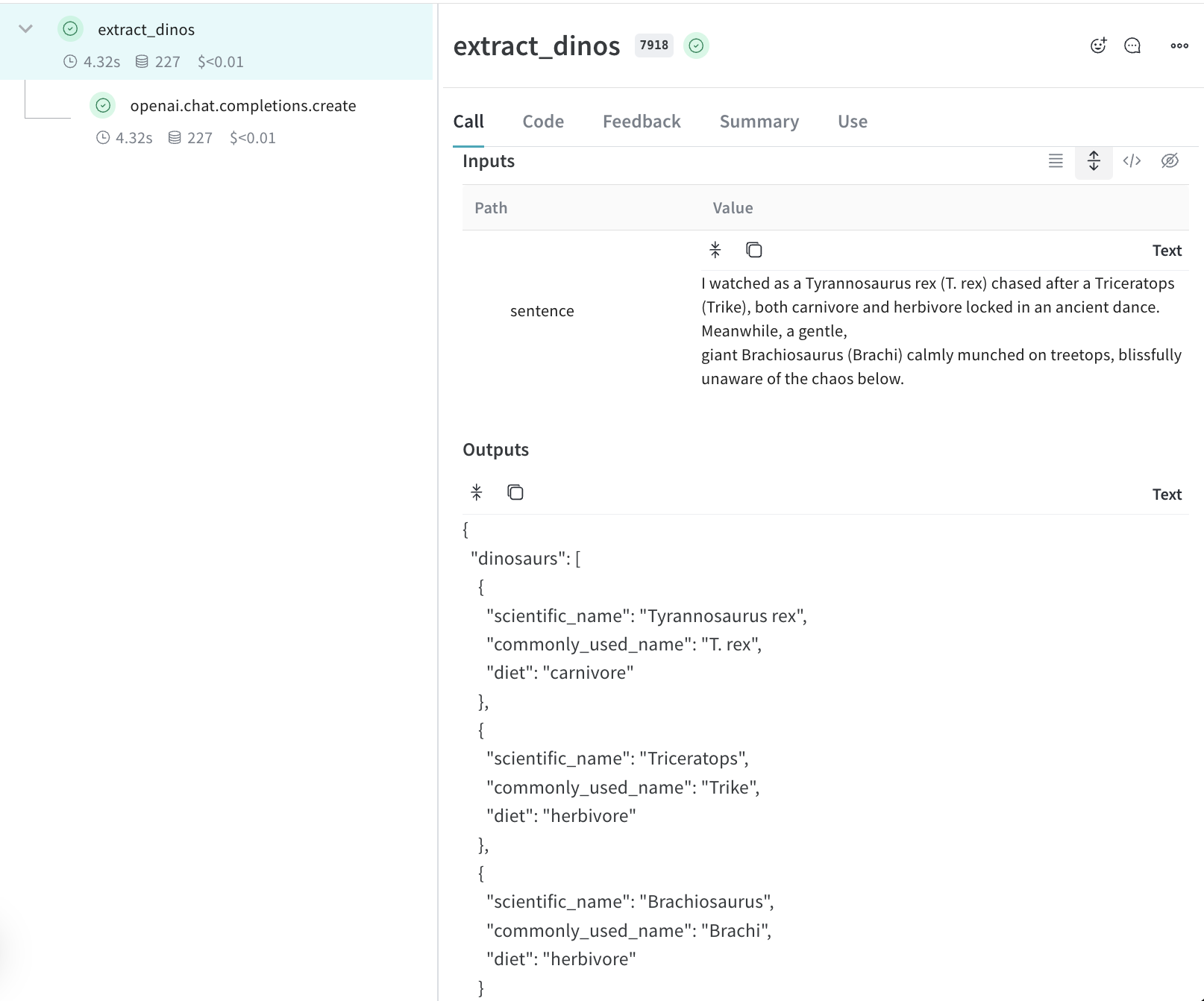
## 4. See traces of your application in your project
Once you've configured your Weave in your project, Weave automatically captures the input & output data, and logs any changes made to the code.
 ## Next steps
Now that you've seen Weave in action, try the W\&B Inference service for easier experimentation. [Get Started with W\&B Inference](/weave/quickstart-inference) - no need to manage multiple API keys, and free credits are included.
Continue learning:
* [Track flows and app metadata](/weave/tutorial-tracing_2) - Dive deeper into tracing complex applications
* [Build evaluations](/weave/tutorial-eval) - Learn systematic model evaluation
* [Explore integrations](/weave/guides/integrations/) - Connect more LLM providers and frameworks
* Try the [Playground](/weave/guides/tools/playground) to test different models
## Next steps
Now that you've seen Weave in action, try the W\&B Inference service for easier experimentation. [Get Started with W\&B Inference](/weave/quickstart-inference) - no need to manage multiple API keys, and free credits are included.
Continue learning:
* [Track flows and app metadata](/weave/tutorial-tracing_2) - Dive deeper into tracing complex applications
* [Build evaluations](/weave/tutorial-eval) - Learn systematic model evaluation
* [Explore integrations](/weave/guides/integrations/) - Connect more LLM providers and frameworks
* Try the [Playground](/weave/guides/tools/playground) to test different models