> ## Documentation Index
> Fetch the complete documentation index at: https://wb-21fd5541-docs-1778-mysql-updates.mintlify.site/llms.txt
> Use this file to discover all available pages before exploring further.
# Track Application Logic
> Learn how to track data flow and metadata in your LLM applications
In the [Track LLM inputs & outputs](/weave/quickstart) tutorial, the basics of tracking the inputs and outputs of your LLMs was covered.
In this tutorial you will learn how to:
* **Track data** as it flows through your application
* **Track metadata** at call time
## Tracking nested function calls
LLM-powered applications can contain multiple LLMs calls and additional data processing and validation logic that is important to monitor. Even deep nested call structures common in many apps, Weave will keep track of the parent-child relationships in nested functions as long as `weave.op()` is added to every function you'd like to track.
Building on the [quickstart example](/weave/quickstart), the following code adds additional logic to count the returned items from the LLM and wrap them all in a higher level function. Additionally, the example uses `weave.op()` to trace every function, its call order, and its parent-child relationship:
```python theme={null}
import weave
import json
from openai import OpenAI
client = OpenAI()
# highlight-next-line
@weave.op()
def extract_dinos(sentence: str) -> dict:
response = client.chat.completions.create(
model="gpt-4o",
messages=[
{
"role": "system",
"content": """Extract any dinosaur `name`, their `common_name`, \
names and whether its `diet` is a herbivore or carnivore, in JSON format."""
},
{
"role": "user",
"content": sentence
}
],
response_format={ "type": "json_object" }
)
return response.choices[0].message.content
# highlight-next-line
@weave.op()
def count_dinos(dino_data: dict) -> int:
# count the number of items in the returned list
k = list(dino_data.keys())[0]
return len(dino_data[k])
# highlight-next-line
@weave.op()
def dino_tracker(sentence: str) -> dict:
# extract dinosaurs using a LLM
dino_data = extract_dinos(sentence)
# count the number of dinosaurs returned
dino_data = json.loads(dino_data)
n_dinos = count_dinos(dino_data)
return {"n_dinosaurs": n_dinos, "dinosaurs": dino_data}
# highlight-next-line
weave.init('jurassic-park')
sentence = """I watched as a Tyrannosaurus rex (T. rex) chased after a Triceratops (Trike), \
both carnivore and herbivore locked in an ancient dance. Meanwhile, a gentle giant \
Brachiosaurus (Brachi) calmly munched on treetops, blissfully unaware of the chaos below."""
result = dino_tracker(sentence)
print(result)
```
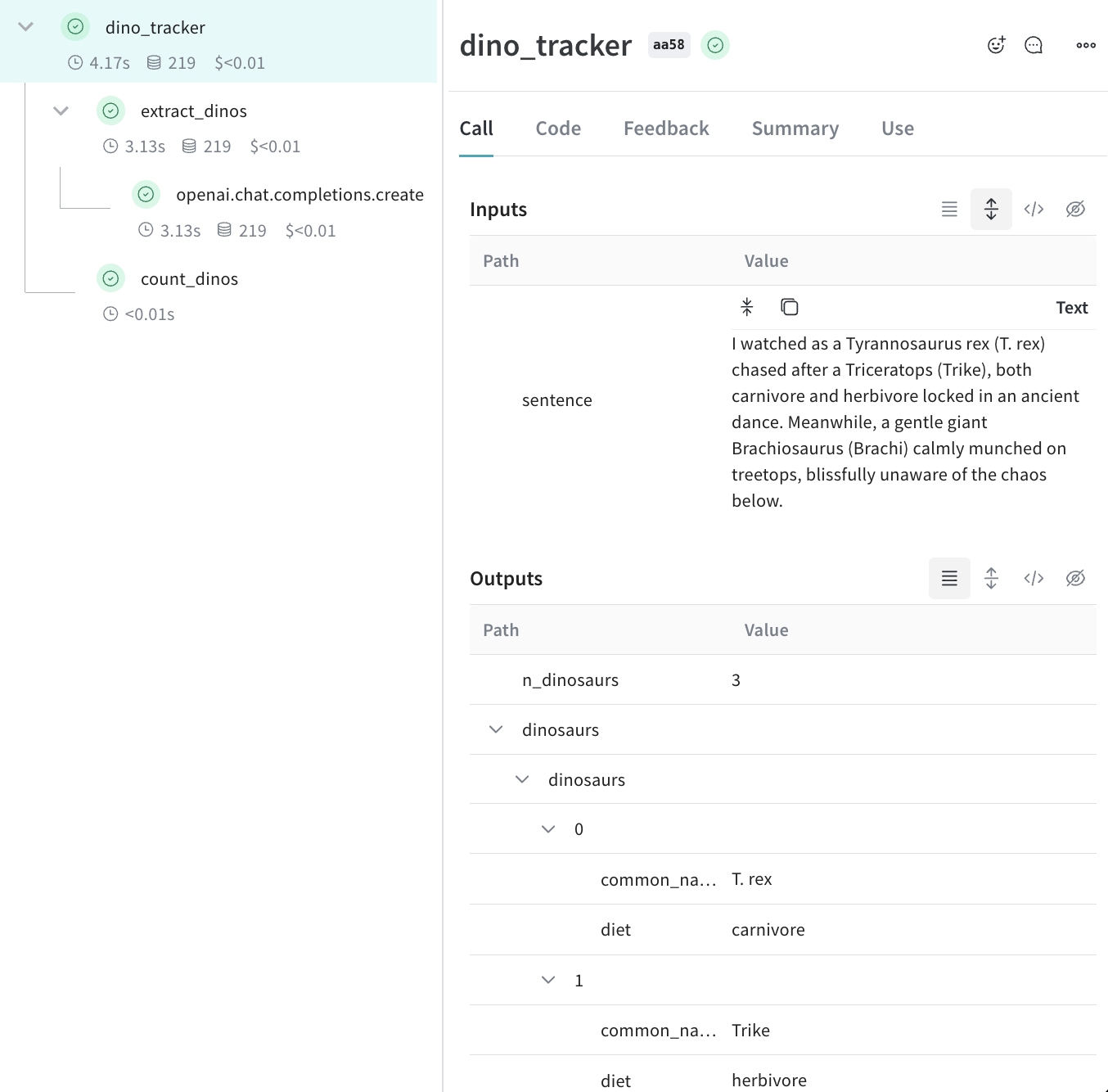
**Nested functions**
When you run the above code, you see the the inputs and outputs from the two nested functions (`extract_dinos` and `count_dinos`), as well as the automatically-logged OpenAI trace.
 ```typescript theme={null}
import OpenAI from 'openai';
import * as weave from 'weave';
const openai = new OpenAI();
const extractDinos = weave.op(async (sentence: string) => {
const response = await openai.chat.completions.create({
model: 'gpt-4o',
messages: [
{
role: 'system',
content:
'Extract any dinosaur `name`, their `common_name`, names and whether its `diet` is a herbivore or carnivore, in JSON format.',
},
{role: 'user', content: sentence},
],
response_format: {type: 'json_object'},
});
return response.choices[0].message.content;
});
const countDinos = weave.op(async (dinoData: string) => {
const parsed = JSON.parse(dinoData);
return Object.keys(parsed).length;
});
const dinoTracker = weave.op(async (sentence: string) => {
const dinoData = await extractDinos(sentence);
const nDinos = await countDinos(dinoData);
return {nDinos, dinoData};
});
async function main() {
await weave.init('jurassic-park');
const sentence = `I watched as a Tyrannosaurus rex (T. rex) chased after a Triceratops (Trike),
both carnivore and herbivore locked in an ancient dance. Meanwhile, a gentle giant
Brachiosaurus (Brachi) calmly munched on treetops, blissfully unaware of the chaos below.`;
const result = await dinoTracker(sentence);
console.log(result);
}
main();
```
**Nested functions**
When you run the above code, you see the the inputs and outputs from the two nested functions (`extractDinos` and `countDinos`), as well as the automatically-logged OpenAI trace.
## Tracking metadata
You can track metadata by using the `weave.attributes` context manager and passing it a dictionary of the metadata to track at call time.
Continuing our example from above:
```python theme={null}
import weave
weave.init('jurassic-park')
sentence = """I watched as a Tyrannosaurus rex (T. rex) chased after a Triceratops (Trike), \
both carnivore and herbivore locked in an ancient dance. Meanwhile, a gentle giant \
Brachiosaurus (Brachi) calmly munched on treetops, blissfully unaware of the chaos below."""
# track metadata alongside our previously defined function
# highlight-next-line
with weave.attributes({'user_id': 'lukas', 'env': 'production'}):
result = dino_tracker(sentence)
```
```plaintext theme={null}
This feature is not available in TypeScript yet. Stay tuned!
```
We recommend tracking metadata at run time, such as your user IDs and your code's environment status (development, staging, or production).
To track system settings, such as a system prompt, we recommend using [Weave Models](/weave/guides/core-types/models)
## What's next?
* Follow the [App Versioning tutorial](/weave/tutorial-weave_models) to capture, version, and organize ad-hoc prompt, model, and application changes.
```typescript theme={null}
import OpenAI from 'openai';
import * as weave from 'weave';
const openai = new OpenAI();
const extractDinos = weave.op(async (sentence: string) => {
const response = await openai.chat.completions.create({
model: 'gpt-4o',
messages: [
{
role: 'system',
content:
'Extract any dinosaur `name`, their `common_name`, names and whether its `diet` is a herbivore or carnivore, in JSON format.',
},
{role: 'user', content: sentence},
],
response_format: {type: 'json_object'},
});
return response.choices[0].message.content;
});
const countDinos = weave.op(async (dinoData: string) => {
const parsed = JSON.parse(dinoData);
return Object.keys(parsed).length;
});
const dinoTracker = weave.op(async (sentence: string) => {
const dinoData = await extractDinos(sentence);
const nDinos = await countDinos(dinoData);
return {nDinos, dinoData};
});
async function main() {
await weave.init('jurassic-park');
const sentence = `I watched as a Tyrannosaurus rex (T. rex) chased after a Triceratops (Trike),
both carnivore and herbivore locked in an ancient dance. Meanwhile, a gentle giant
Brachiosaurus (Brachi) calmly munched on treetops, blissfully unaware of the chaos below.`;
const result = await dinoTracker(sentence);
console.log(result);
}
main();
```
**Nested functions**
When you run the above code, you see the the inputs and outputs from the two nested functions (`extractDinos` and `countDinos`), as well as the automatically-logged OpenAI trace.
## Tracking metadata
You can track metadata by using the `weave.attributes` context manager and passing it a dictionary of the metadata to track at call time.
Continuing our example from above:
```python theme={null}
import weave
weave.init('jurassic-park')
sentence = """I watched as a Tyrannosaurus rex (T. rex) chased after a Triceratops (Trike), \
both carnivore and herbivore locked in an ancient dance. Meanwhile, a gentle giant \
Brachiosaurus (Brachi) calmly munched on treetops, blissfully unaware of the chaos below."""
# track metadata alongside our previously defined function
# highlight-next-line
with weave.attributes({'user_id': 'lukas', 'env': 'production'}):
result = dino_tracker(sentence)
```
```plaintext theme={null}
This feature is not available in TypeScript yet. Stay tuned!
```
We recommend tracking metadata at run time, such as your user IDs and your code's environment status (development, staging, or production).
To track system settings, such as a system prompt, we recommend using [Weave Models](/weave/guides/core-types/models)
## What's next?
* Follow the [App Versioning tutorial](/weave/tutorial-weave_models) to capture, version, and organize ad-hoc prompt, model, and application changes.